
Just received your shiny new ADCB debit card in the mail and unsure what to do next? You're not alone — thousands of UAE residents face the exact same confusion every month.
Here's the deal: until you activate the card, it's just a piece of plastic. No ATM withdrawals, no online shopping, no contactless tap.
The good news? Abu Dhabi Commercial Bank gives you six official ways to activate it — and most of them take under two minutes. In this guide, you'll discover:
- The exact documents you need before activation
- All 6 official ADCB activation methods (Mobile App, SMS, Phone, Online, ATM, Branch)
- The exact SMS format and short code to use
- How to set or reset your 4-digit PIN safely
- Important security tips after activation
Let's dive in.
Quick Facts: ADCB Debit Card Activation
| Detail | Information |
|---|---|
| Bank Name | Abu Dhabi Commercial Bank (ADCB) |
| Activation Methods | 6 (Mobile App, SMS, Phone, Online, ATM, Branch) |
| SMS Short Code | 2626 |
| SMS Format | ACT <last 6 digits of card> <4-digit PIN> |
| Contact Centre (Within UAE) | 600 50 2030 |
| Contact Centre (Outside UAE) | +971 2 6210090 |
| Service Hours | 24 hours a day, 7 days a week |
| WhatsApp Banking | Discontinued from 28 April 2026 |
| PIN Length | 4 digits (chosen by you) |
What Is ADCB Debit Card Activation?
Activation is the final security step that links your physical card to your ADCB account and unlocks transactions.
Without activation, your card cannot:
- Withdraw cash from any ATM
- Make POS or contactless payments at retail stores
- Process online purchases or e-commerce transactions
- Be added to Apple Pay or other digital wallets
The activation also requires you to create your own 4-digit PIN. ADCB no longer mails pre-printed PINs — you set it yourself for maximum security.
Documents Required Before You Activate Your ADCB Debit Card
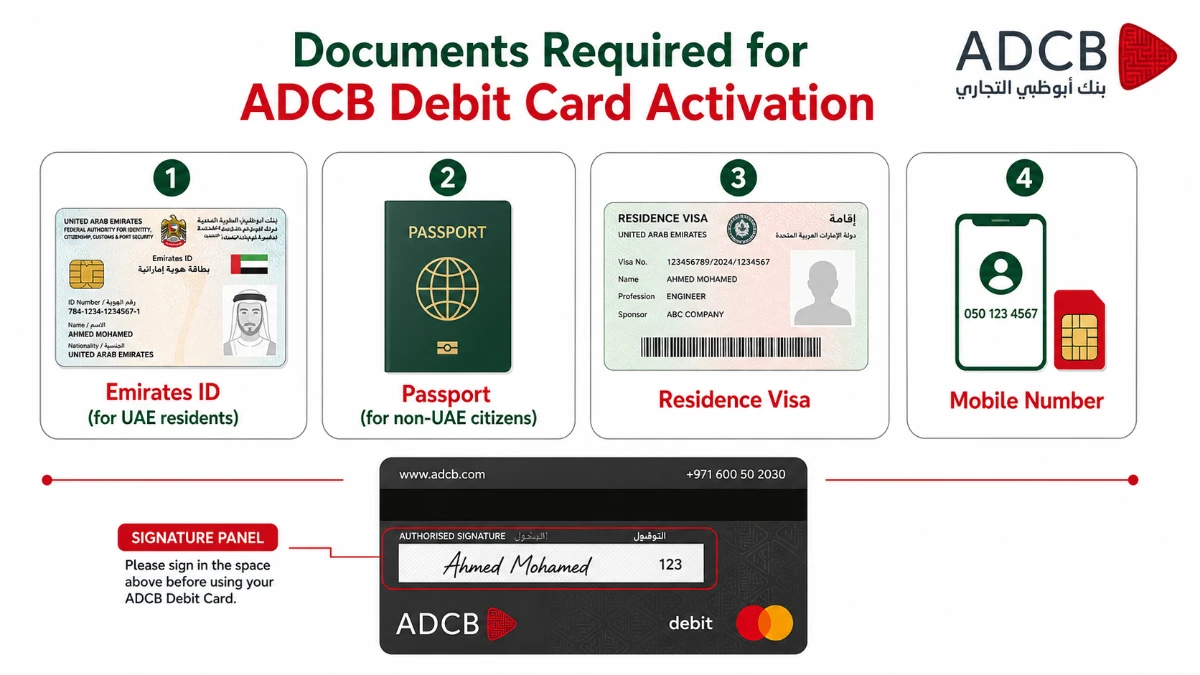
You don't need a paperwork mountain to activate. But you do need to keep these four essentials close at hand.
| # | Document / Item | Who Needs It | Why It's Needed |
|---|---|---|---|
| 1 | Emirates ID | UAE residents & citizens | Identity proof at branch / IVR verification |
| 2 | Valid Passport | Non-UAE citizens / new arrivals | Backup identity document |
| 3 | Residence Visa | Expat residents | Confirms legal residency status |
| 4 | Registered Mobile Number | All customers | Receives OTP & SMS confirmation |
| 5 | The Physical Debit Card | All customers | You'll need the last 6 digits |
How to Activate Your ADCB Debit Card via Mobile Banking App
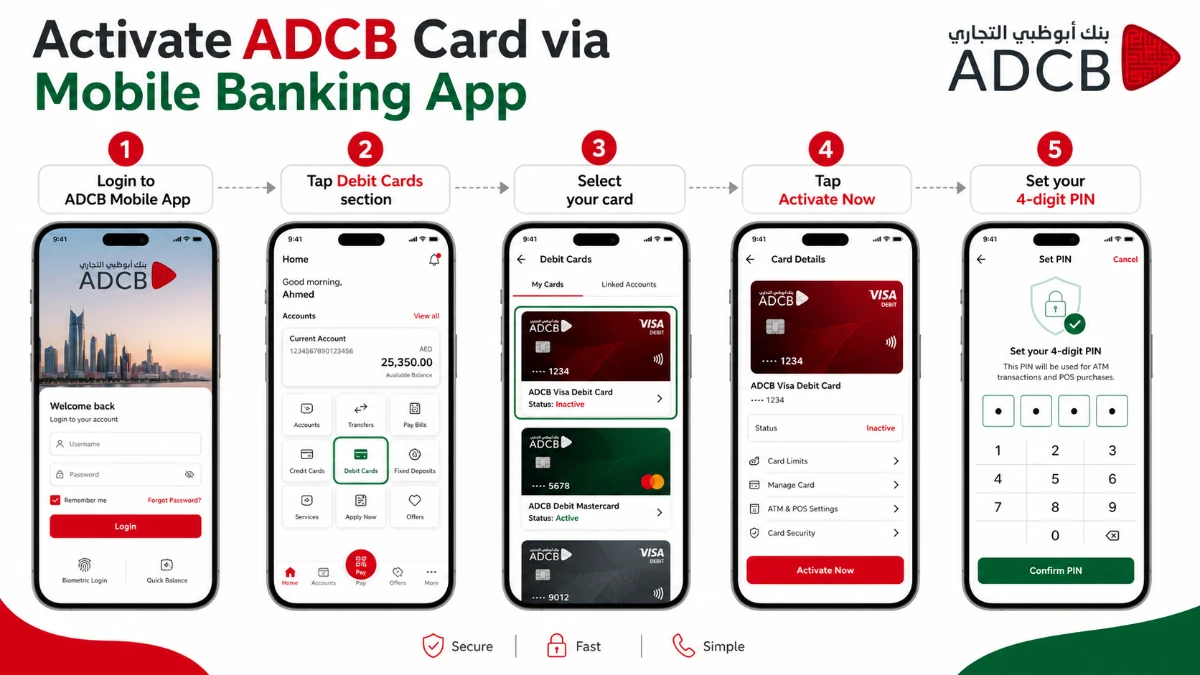
The ADCB Mobile Banking App is the fastest, most-recommended way to activate your debit card. Available on iPhone, Android and Huawei devices, in English and Arabic.
Featured-snippet answer: To activate an ADCB debit card on the app, log in, open the Debit Cards section, select your card, tap Activate Now, accept terms, and set your 4-digit PIN. Activation completes in under a minute.
Step-by-Step: Activate Through the ADCB Mobile App
- Log in to the ADCB Mobile Banking App with your username and password (or biometric sign-in).
- Tap the Debit Cards section from the dashboard.
- Select the new card you want to activate.
- Tap Activate Now.
- Review and accept the important terms and conditions.
- Choose Set PIN and key in a unique 4-digit PIN.
- Re-enter the PIN to confirm. Done — your card is live.
Need to download the app? Use the official Dubai credit card resource hub to compare ADCB digital tools and other UAE banking apps.
How to Activate Your ADCB Debit Card via SMS Banking
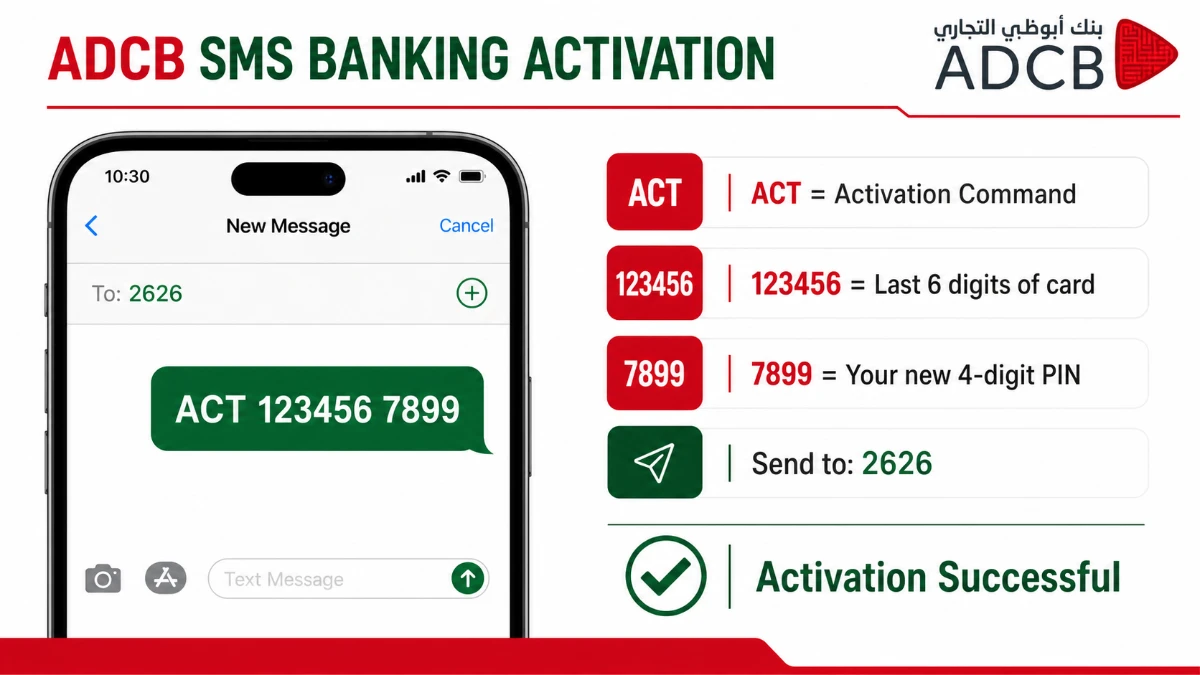
No internet? No problem. ADCB lets you activate your card and set the PIN with a single text message.
The Exact SMS Format
Send the following from your registered mobile number to 2626:
ACT <last 6 digits of card no> <4-digit PIN>Example:
ACT 123456 7899
| Field | Value | Meaning |
|---|---|---|
| ACT | Keyword | Tells ADCB this is an activation request |
| 123456 | Last 6 digits of card | Identifies your specific card |
| 7899 | 4-digit PIN | The PIN you choose (avoid DOB or 1234) |
| Send To | 2626 | ADCB SMS short code (UAE only) |
Supplementary Card Activation
Have a supplementary debit card for a family member? Each supplementary card needs its own separate PIN. Use the same format with the supplementary card's last 6 digits.
How to Activate Your ADCB Debit Card via Phone Banking
Prefer talking to a human (or an IVR)? ADCB's contact centre operates 24 hours, 7 days a week.
Step-by-Step: Activation via Phone Call
- Dial 600 50 2030 from your registered mobile (within UAE).
- Outside the UAE, dial +971 2 6210090.
- Press 8 to activate your card and set up your PIN.
- Follow the IVR prompts: enter the last digits of your card and verify your identity.
- Choose your new 4-digit PIN as instructed.
- You'll receive an SMS confirmation once activation is complete.
| Customer Segment | Phone Number |
|---|---|
| General / Aspire customers | 600 50 2030 |
| Privilege Banking | 600 50 8008 |
| Excellency Banking | 600 50 2004 |
| Islamic Banking | 600 56 2626 |
| Outside UAE | +971 2 6210090 |
How to Activate Your ADCB Debit Card via Online (Personal Internet) Banking
If you're already enrolled in ADCB Personal Internet Banking, you can activate your card from a desktop browser.
- Go to the official ADCB website and log in to Personal Internet Banking.
- Click Debit Cards in the left-hand menu.
- Choose the card you want to activate.
- Click Activate Card and follow the prompts.
- Set your 4-digit PIN and confirm.
- An SMS confirmation arrives on your registered number.
How to Activate Your ADCB Debit Card at an ATM or Branch
Old-school but reliable. Two offline routes are available across ADCB's 55+ branches and 425+ ATMs in the UAE.
At an ADCB ATM
- Visit any ADCB or UAE Switch ATM.
- Insert your new debit card.
- Select PIN Services → Set / Change PIN.
- Authenticate using OTP sent to your registered mobile.
- Enter your new 4-digit PIN twice and confirm.
At an ADCB Branch
Walk into your nearest ADCB branch with the following:
- Your physical debit card
- Original Emirates ID (or Passport + Residence Visa for new residents)
- Your registered mobile phone
A relationship officer will activate the card and help you set the PIN on the spot. Useful if your registered mobile number has changed and SMS won't reach you.
Online vs Offline: Which Activation Method Should You Use?
| Method | Time | Need Internet? | Need to Visit Branch? | Best For |
|---|---|---|---|---|
| Mobile Banking App | 1–2 min | Yes | No | Smartphone users |
| SMS to 2626 | < 1 min | No | No | Quickest method |
| Phone Banking (600 50 2030) | 3–5 min | No | No | Need human help |
| Internet Banking | 2–3 min | Yes | No | Desktop users |
| ATM | 2 min | No | No | Already at the ATM |
| Branch Visit | 15–30 min | No | Yes | Updated mobile number |
ADCB Debit Card Security & Safety Tips After Activation
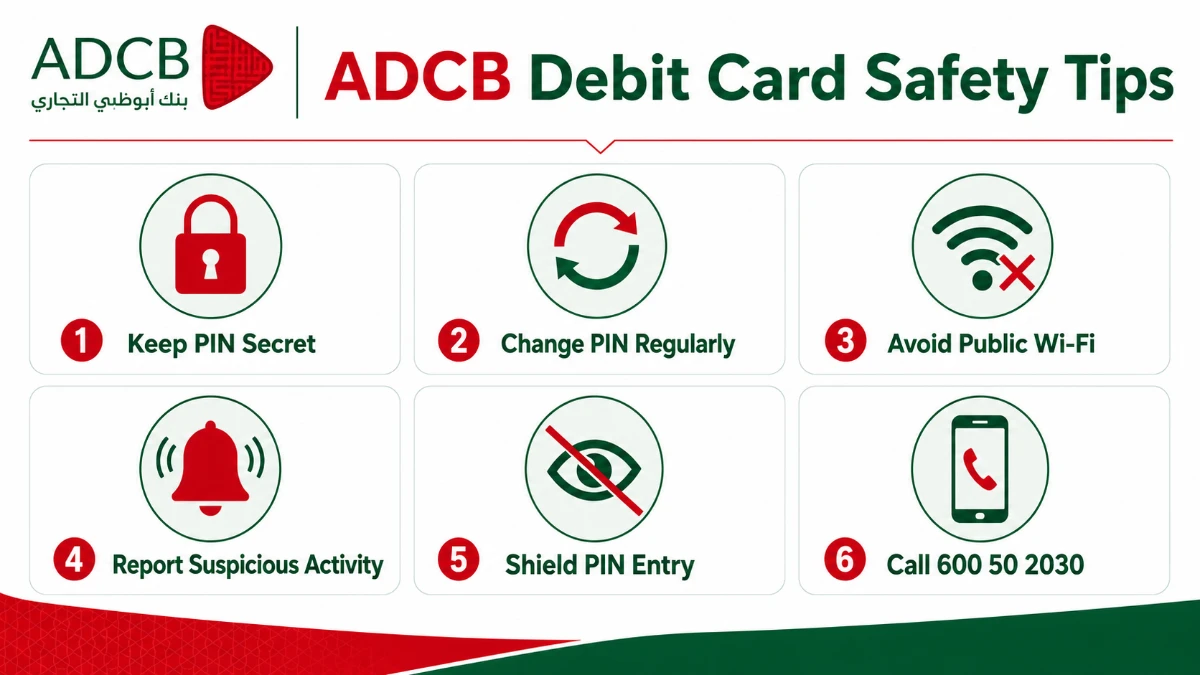
Activation is half the battle. Now you need to protect the card from fraud, skimming and phishing.
- Never share your 4-digit PIN — not with family, not with bank staff. ADCB will never ask for it.
- Change your PIN every few months using the same SMS format (
ACTto 2626) or the mobile app. - Avoid public Wi-Fi while transacting online. If unavoidable, use a trusted VPN.
- Shield the keypad when entering PIN at POS terminals or ATMs.
- Enable transaction SMS alerts in the app so you're instantly notified of any debit.
- Report suspicious activity immediately to ADCB on 600 50 2030.
If you want a deeper dive into smart card usage in the UAE, check our companion Dubai credit and debit card guide for tips that work across all UAE banks.
Why Activation Matters: Benefits You Unlock
| Benefit | What It Means for You |
|---|---|
| Full Transaction Access | ATM withdrawals, POS payments, online purchases |
| Verified Card Receipt | Proves the card reached you (anti-fraud) |
| Custom 4-Digit PIN | You choose it — no pre-printed mailers |
| Apple Pay Eligibility | Add to digital wallet from the app |
| Custom Limits | Set ATM, online & international caps yourself |
| Contactless Tap-to-Pay | Enabled automatically on activation (up to AED 500) |
| TouchPoints Earning | Eligible debit cards earn rewards on spend |
Frequently Asked Questions (FAQ)
How long does ADCB debit card activation take?
Activation typically completes in under two minutes via the ADCB Mobile App or SMS to 2626. Phone banking takes 3–5 minutes, while a branch visit may take 15–30 minutes depending on queue length. You'll receive an SMS confirmation once your card is live.
What is the SMS format to activate an ADCB debit card?
Send ACT <last 6 digits of card> <your 4-digit PIN> to 2626 from your registered mobile number. For example: ACT 123456 7899. The same format is used to change your PIN later. SMS only works from within the UAE on a registered ADCB mobile number.
Can I activate my ADCB card from outside the UAE?
Yes. Use the ADCB Mobile Banking App (works globally with internet), Personal Internet Banking, or call the international helpline at +971 2 6210090. SMS to 2626 only works inside the UAE, so it's not an option when you're abroad.
Can I still use ADCB WhatsApp Banking to activate my card?
No. ADCB has officially discontinued WhatsApp Banking with effect from 28 April 2026. All card-related services have moved to the ADCB Mobile Banking App and Personal Internet Banking, which offer faster and more secure activation.
What should I do if I forget the PIN I set during activation?
You can reset your PIN by sending a fresh ACT SMS to 2626 with a new 4-digit code, by using the Set / Reset PIN option in the ADCB Mobile App, or by calling 600 50 2030 and selecting option 8. No need to visit a branch in most cases.
Does ADCB charge a fee to activate the debit card?
No. Card activation itself is completely free across all six methods — Mobile App, SMS, phone, online banking, ATM and branch. Standard SMS charges from your telecom operator may apply if you activate via 2626. Annual card fees and transaction fees follow your account's regular schedule.
Do supplementary ADCB debit cards need separate activation?
Yes. Each supplementary card needs its own activation and unique PIN. Send the same ACT SMS format from your registered mobile, replacing the last 6 digits with the supplementary card's last 6 digits. The primary cardholder controls the activation but the supplementary user keeps the PIN private.
Is the activation OTP valid for international transactions too?
Activation generates a one-time confirmation, not a permanent OTP. For international online transactions, ADCB sends a fresh OTP each time. You may also need to enable international usage separately from the Mobile App's card controls or phone banking before travelling.
Conclusion
Activating your ADCB debit card is straightforward — and you have six official routes to choose from. Three big takeaways before you go:
- The Mobile Banking App is the fastest and most feature-rich option. If you've installed it, use it.
- SMS
ACTto 2626 remains the simplest backup when the app or internet is unavailable. - Always set a unique 4-digit PIN you'll remember, and never share it — not even with bank staff.
Ready to activate? Open your ADCB app right now or send that single SMS — your card will be live in under a minute.
What's your preferred ADCB activation method — the app, SMS, or a quick branch visit? Drop a comment below and let other UAE readers know.
Sources
All information verified from official Abu Dhabi Commercial Bank (ADCB) sources on 5 May 2026.
- ADCB — Cards Features Chip & PIN — https://www.adcb.com/en/personal/cards/card-features/chip-pin
- ADCB — Chip & PIN FAQs — https://www.adcb.com/en/get-in-touch/faqs/cards/chip-and-pin
- ADCB — SMS Banking Enquiry & Keywords — https://www.adcb.com/en/ways-to-bank/sms-banking/sms-enquiry
- ADCB — SMS Banking Overview — https://www.adcb.com/en/ways-to-bank/sms-banking/
- ADCB — Mobile Banking App & Card Activation — https://www.adcb.com/en/ways-to-bank/mobile-banking/
- ADCB — Activate Your Card (Consumer Education) — https://www.adcb.com/en/consumer-education-awareness/videos/mobile-banking/card-services/activate-your-card
- ADCB — Set or Reset Card PIN — https://www.adcb.com/en/consumer-education-awareness/videos/mobile-banking/card-services/setting-card-pin
- ADCB — Phone Banking Services — https://www.adcb.com/en/ways-to-bank/phone-banking/
- ADCB — Contact Us & Call Numbers — https://www.adcb.com/en/get-in-touch/call-us/
- ADCB — WhatsApp Banking Service Update (effective 28 April 2026) — https://www.adcb.com/en/ways-to-bank/whatsapp-banking/
- ADCB — Branches and ATMs Network — https://www.adcb.com/en/ways-to-bank/atm-and-branches/
- ADCB — Service Guarantee in the UAE — https://www.adcb.com/en/personal/adcb-for-you/service-guarantee/
