
Got your shiny new FAB Ratibi Card in hand but can’t use it yet? You’re not alone — every UAE worker who receives a Ratibi card hits the same wall on day one: “How do I activate this thing without queuing at a branch?”
Here’s the deal: you can activate your Ratibi Card 100% online — for free — in under 5 minutes, straight from your phone. No bank visit. No paperwork. No charges.
In this guide, you’ll discover:
- What the FAB Ratibi Card actually is (and who it’s built for)
- Everything you need before you start the activation
- The exact FAB Mobile App activation steps — screen by screen
- The backup SMS to 2121 method (and when to use it)
- How to check your salary balance once the card is live
Let’s dive in.
Quick Facts: FAB Ratibi Card At A Glance
| Item | Details |
|---|---|
| Card Type | Prepaid Payroll Card (not a credit/debit card) |
| Issuer | First Abu Dhabi Bank (FAB) |
| Salary Cap | Up to AED 5,000 / month |
| Bank Account Required | No |
| Activation Cost | Free (zero charges) |
| Activation Time | Instant – usually under 5 minutes |
| Activation Channels | FAB Mobile App, SMS to 2121, FAB Customer Care |
| WPS Compliance | 100% compliant with UAE Wages Protection System |
| Insurance | Free personal accident cover up to AED 25,000 |
| Network Acceptance | VISA / Mastercard worldwide |
What Is The FAB Ratibi Card And Why It Matters In UAE
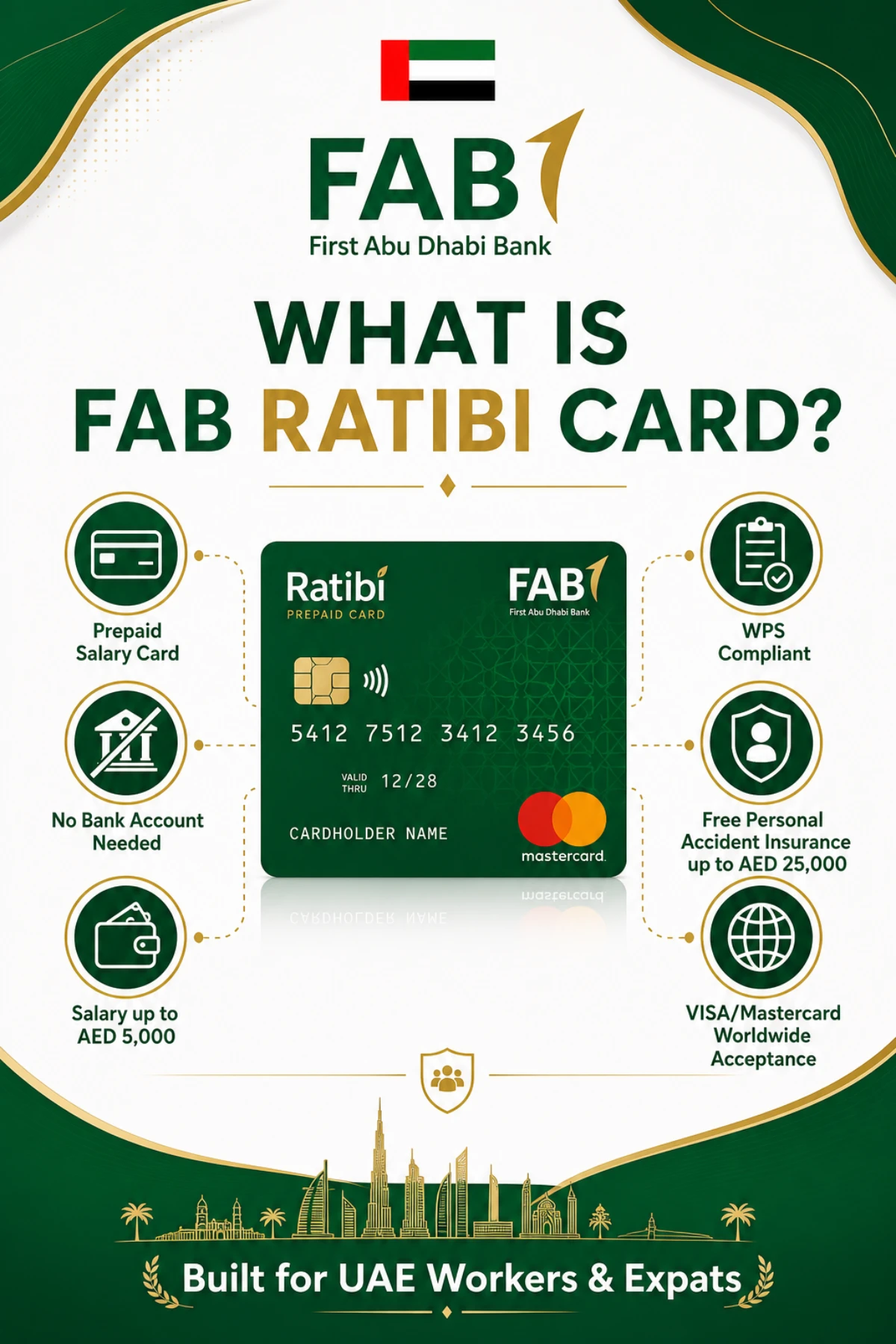
The Ratibi Card is FAB’s answer to a real-world UAE problem: millions of low-income workers don’t qualify for a regular bank account — but they still need a safe, electronic way to receive their salary.
So FAB built Ratibi as a prepaid payroll card. Your employer loads your salary onto the card every month, and you spend it like any other card.
Who The Ratibi Card Is Designed For
Ratibi is purpose-built for:
- UAE-resident employees earning up to AED 5,000 per month
- Workers whose employers hold a corporate account with FAB
- Companies that need a WPS-compliant salary disbursement solution
- Employees who don’t want — or don’t qualify for — a full bank account
Key Benefits Worth Knowing
Here’s why the Ratibi Card is so popular in the UAE workforce:
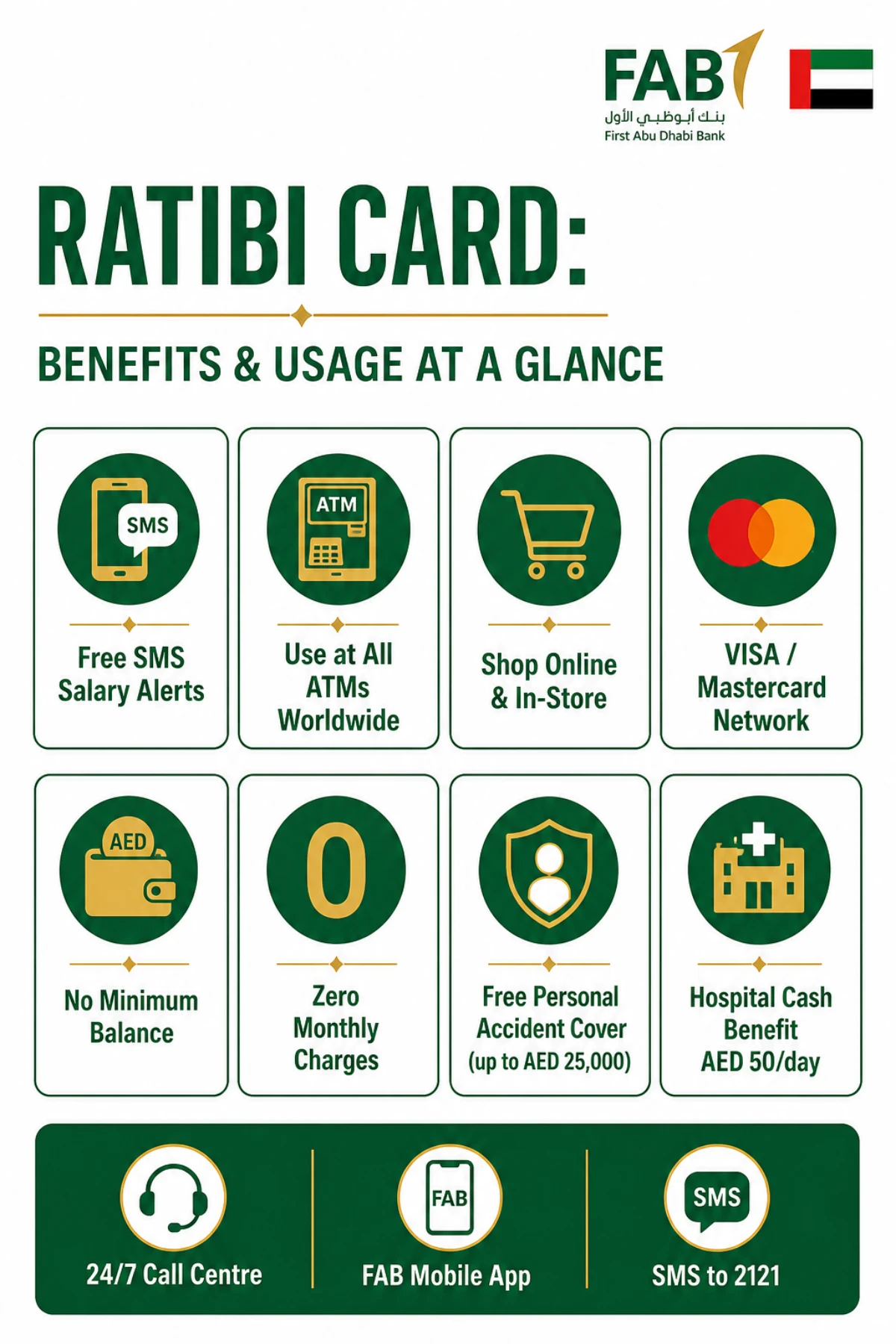
- Free SMS alerts on every salary credit
- Works at all ATMs, in-store, and online globally
- Accepted on VISA / Mastercard networks worldwide
- No minimum balance and no monthly maintenance charges
- Free personal accident insurance — up to AED 25,000 for death/permanent disability
- Hospitalisation cash benefit of AED 50/day (max 30 days, up to AED 1,500)
- Repatriation of mortal remains coverage up to AED 5,000
- You can set your own PIN at any FAB ATM
- 24/7 customer support through the FAB call centre
For a deeper dive into FAB account products, see our guide on the FAB Personal Current Account 2026-27 — UAE definitive guide.
Eligibility & Documents Required Before You Activate
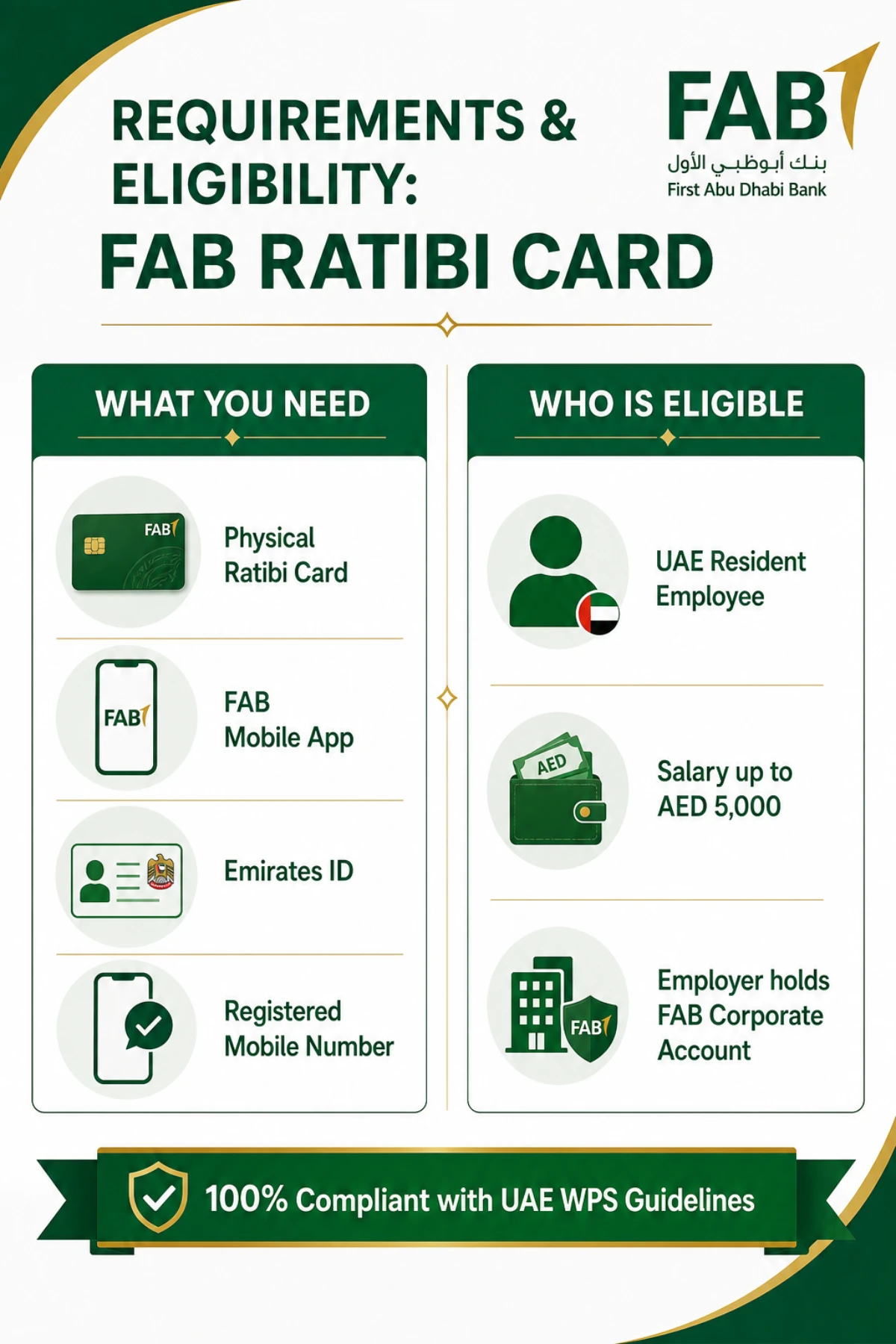
Activation only takes 5 minutes — but only if you have the right items in front of you. Skipping a step here is the #1 reason activation fails.
Eligibility Criteria
| Criteria | Requirement |
|---|---|
| Residency | Must be a UAE resident with a valid Emirates ID |
| Employer Account | Employer must hold a Corporate Account with FAB |
| Monthly Salary | Up to AED 5,000 |
| KYC | Complete and up-to-date KYC details with FAB |
| Card Status | Card must be physically issued and dispatched by employer |
Documents & Items You Need On Hand
Keep these 4 essentials ready before you open the FAB Mobile App:
| # | Item | Purpose |
|---|---|---|
| 1 | Physical FAB Ratibi Card | You’ll need to enter the 16-digit card number |
| 2 | FAB Mobile App (Android / iOS) | Primary activation channel |
| 3 | Emirates ID | Identity verification (photo or scan) |
| 4 | Registered mobile number | To receive the OTP / verification code |
How To Activate FAB Ratibi Card Online Via The FAB Mobile App
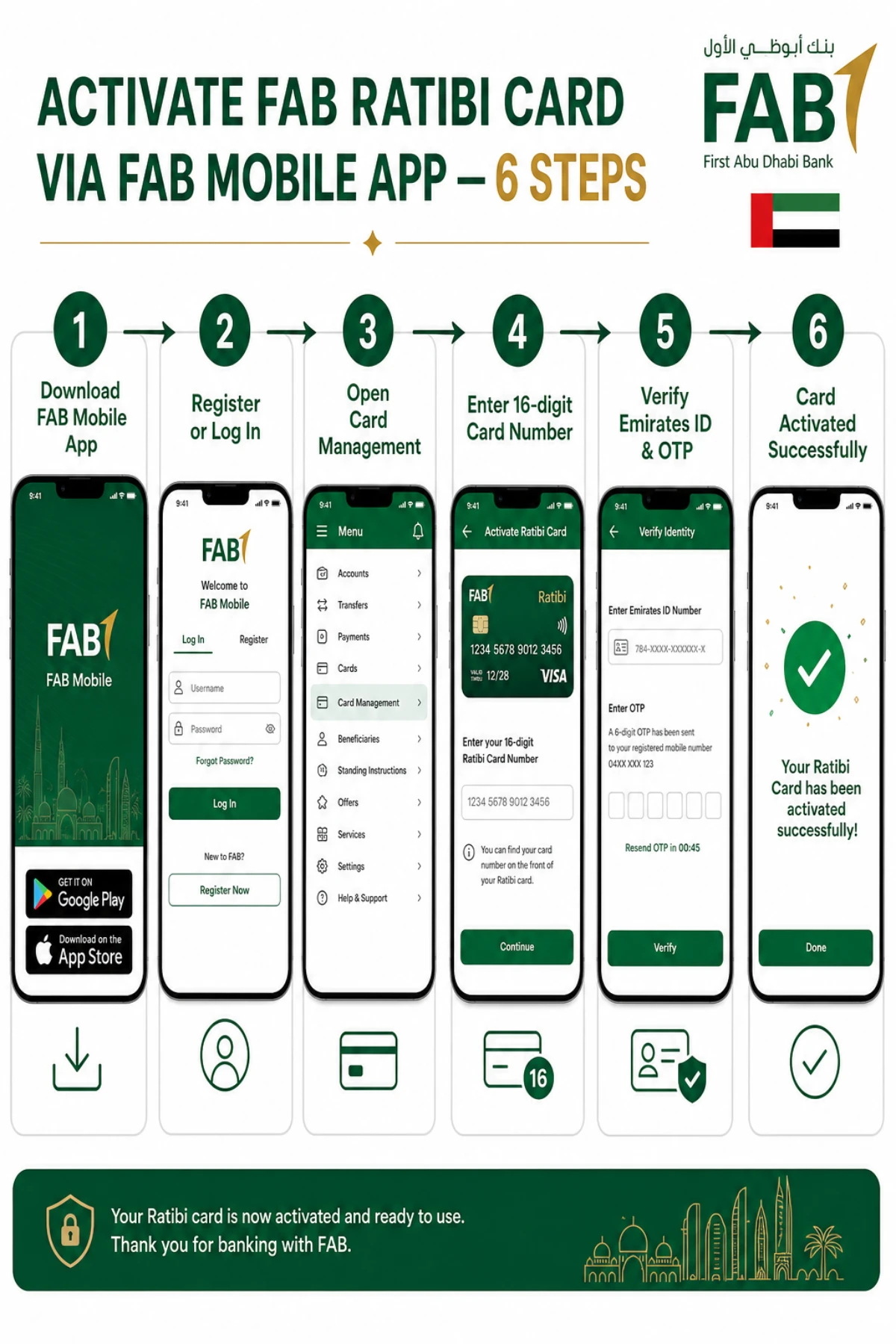
Step 1 — Download & Install The FAB Mobile App
Open the Google Play Store (Android) or Apple App Store (iOS) and search for “FAB Mobile” by First Abu Dhabi Bank.
- Verify the developer name shows “First Abu Dhabi Bank PJSC”
- Tap Install and wait for the download to complete
- Open the app and accept the permissions it requests
Step 2 — Register Or Log In
If you’re a first-time user, tap Register and follow the on-screen flow.
- Choose the “Ratibi Cardholder” registration option
- Enter your 16-digit Ratibi Card number
- Provide your Emirates ID number
- Create your username, password, and 4-digit app passcode
Already registered? Just enter your credentials and tap Login.
Step 3 — Open Card Management
Once you’re logged in:
- Tap Cards or Card Management / Services on the home dashboard
- Find your Ratibi Card in the list
- Tap Activate Card (or “Activate Ratibi Card”)
Step 4 — Verify Your Identity
The app will now ask you to verify it’s really you. Depending on your device and app version, you may need to:
- Take a live photo / short video of your face
- Scan or upload your Emirates ID (front & back)
- Enter the OTP sent to your registered mobile number
Step 5 — Confirm & Set Your PIN
After identity is verified:
- Tap Confirm to finalise activation
- You’ll see a green “Card Activated Successfully” screen
- You can set or change your 4-digit PIN at any FAB ATM, or via the app if your version supports it
Step 6 — Start Using Your Ratibi Card
That’s it. Your card is live.
You can now:
- Withdraw cash at any ATM in the UAE or abroad
- Pay at retail stores accepting VISA / Mastercard
- Shop online on UAE and international websites
- Receive free SMS alerts on every salary credit
Alternative: Activate FAB Ratibi Card Via SMS (Backup Method)
No smartphone? No problem. FAB also supports SMS-based activation, though the mobile app is the recommended channel.
The SMS Activation Format
| Step | Action | Required |
|---|---|---|
| 1 | Open SMS app on your registered mobile number | Mobile phone |
| 2 | Type the message: CACT XXXX YYYY (XXXX = last 4 digits of card, YYYY = your chosen 4-digit PIN) | Card & new PIN |
| 3 | Send the SMS to 2121 | FAB SMS short code |
| 4 | Wait for confirmation SMS from FAB | Few seconds |
App vs SMS — Which Should You Use?
| Feature | FAB Mobile App | SMS to 2121 |
|---|---|---|
| Activation Speed | Instant | Usually instant |
| Identity Verification | Emirates ID + OTP | Mobile number only |
| Security Level | High (multi-factor) | Lower |
| Cost | Free | Free |
| Balance Check After Activation | Yes, real-time | Limited |
| Recommended For | All users | Backup only |
How To Check Ratibi Card Balance After Activation
Once your card is active, you’ll want to confirm your salary has actually landed. FAB gives you four official ways to check.
Method 1 — FAB Mobile App
- Open the FAB Mobile app and log in
- Tap Prepaid Cards > select your Ratibi Card
- The current available balance is shown on the card screen
Method 2 — Magnati Prepaid Cards Enquiry Portal
FAB partners with Magnati for prepaid card services. Use the official Magnati PPC Inquiry portal to check balance with your last 4 digits + Card ID + captcha.
Method 3 — SMS Balance Check
Send a balance enquiry SMS to 2121 from your registered mobile number — you’ll get an instant balance reply.
Method 4 — At Any FAB ATM
Insert your Ratibi Card, enter PIN, and select Balance Enquiry.
Common Activation Problems & How To Fix Them
Activation usually works on the first try. But when it doesn’t, here are the real-world fixes.
| Problem | Likely Cause | Fix |
|---|---|---|
| OTP not received | Mobile number not registered with FAB | Ask HR to update your number with FAB |
| Card number not recognised | Wrong digits / card not yet uploaded by employer | Re-check 16 digits; ask HR to confirm upload |
| Emirates ID rejected | Expired or unclear scan | Renew Emirates ID; rescan in good light |
| App keeps crashing | Old app version | Update FAB Mobile from Play Store / App Store |
| “Card already active” | Activation succeeded earlier | Try a small ATM balance enquiry to confirm |
| Activation stuck on verify | Server / network issue | Switch network or retry after 30 minutes |
If you’re also looking to manage another bank card, check our walk-through on ADCB Debit Card Activation — 6 easy methods to activate & set PIN in UAE.
Ratibi Card Usage Rules & Important Limitations
Before you start swiping, know what your Ratibi Card can — and cannot — do.
What You Can Do
- Withdraw your salary at any ATM in the UAE and abroad
- Pay at any merchant on the VISA / Mastercard network
- Shop online (UAE and international stores)
- Track salary credits via free SMS alerts
- Reset your PIN at FAB ATMs anytime
What You Cannot Do
- Receive a salary above AED 5,000 on this card
- Treat it as a credit card — there is no credit line
- Apply for the card directly — only your employer can issue it
- Reload it yourself — only your employer credits salary via WPS
Frequently Asked Questions
Q1. Are there any charges for activating the Ratibi Card?
No. Activating your FAB Ratibi Card is 100% free, whether you do it via the FAB Mobile App, SMS to 2121, or by calling FAB customer care. There are no monthly maintenance fees and no minimum balance requirement either.
Q2. How long does Ratibi Card activation take online?
Activation through the FAB Mobile App is typically instant. End-to-end — including downloading the app, registering, and verifying identity — most users complete the process in under 5 minutes. SMS activation usually completes within seconds of sending the message to 2121.
Q3. Can I withdraw cash from any ATM with my Ratibi Card?
Yes. The Ratibi Card works at all ATMs in the UAE and on the VISA / Mastercard network worldwide. You can withdraw your salary anytime, although third-party ATMs (outside FAB) may apply their own withdrawal charges.
Q4. What happens if I forget my Ratibi Card PIN?
You can reset your 4-digit PIN at any FAB ATM using the “Set/Change PIN” option, or by contacting FAB customer care at 600 52 2235. The Ratibi Card is a prepaid card, so you’ll never be asked for a CVV during PIN reset.
Q5. Do I need a bank account to use the Ratibi Card?
No. That’s the entire point of Ratibi. You do not need a FAB bank account, or any other bank account, to receive your salary on this card. Your employer credits salary directly to the prepaid card every month under the UAE WPS framework.
Q6. Can I activate the Ratibi Card without an Emirates ID?
No. A valid Emirates ID is mandatory for KYC verification. The FAB Mobile App will ask you to scan or upload your Emirates ID during the activation flow. Make sure your ID is not expired before starting the process.
Q7. Is the Ratibi Card the same as a credit card?
No. The Ratibi Card is a prepaid payroll card, not a credit card. You can only spend the salary balance loaded onto it by your employer — there is no credit limit, no interest, and no minimum monthly payment. Think of it as a reloadable wallet card, not a borrowing tool.
Q8. What should I do if I lose my Ratibi Card?
Call FAB customer care immediately at 600 52 2235 to block the card. Then inform your HR/employer — they must apply to FAB for a replacement card on your behalf. Do not try to apply for a new card directly, as Ratibi cards are issued only through corporate channels.
Final Takeaway: Activate Today, Get Paid Tomorrow
Here’s what to remember:
- The FAB Mobile App is the fastest, safest way to activate your Ratibi Card — instant, free, and secure with Emirates ID + OTP.
- Keep your Ratibi Card, FAB Mobile App, Emirates ID, and registered mobile number ready before you start — this single step prevents 90% of activation failures.
- If anything goes wrong, the FAB 24/7 helpline (600 52 2235) is your safety net.
Your move? Open the FAB Mobile App right now, follow the 6 steps above, and have your salary card live before your next pay cycle.
Have you activated your Ratibi Card already — or are you stuck on a specific step? Drop your question in the comments and we’ll guide you through it.
Sources
- Ratibi Prepaid Card — First Abu Dhabi Bank (UAE) — https://www.bankfab.com/en-ae/personal/prepaid-cards/ratibi
- Prepaid Cards — First Abu Dhabi Bank (UAE) — https://www.bankfab.com/en-ae/personal/prepaid-cards
- FAB Mobile Banking App — First Abu Dhabi Bank (UAE) — https://www.bankfab.com/en-ae/personal/help-and-support/digital-banking/mobile-banking
- FAB Online Banking Login Portal — https://online.bankfab.com/PersonalBankingWeb/login
- Cards Chip and PIN — First Abu Dhabi Bank (UAE) — https://www.bankfab.com/en-ae/personal/credit-cards/services/chip-and-pin
- Payit Digital Wallet (Ratibi Linking) — First Abu Dhabi Bank — https://www.bankfab.com/en-ae/personal/help-and-support/digital-banking/payit
- FAB Help & Support — First Abu Dhabi Bank — https://www.bankfab.com/en-ae/personal/help-and-support
- Magnati Prepaid Cards Enquiry Portal (Official FAB partner) — https://ppc.magnati.com/ppc-inquiry
- FAB Mobile (Google Play) — https://play.google.com/store/apps/details?id=com.fab.personalbanking
- FAB Mobile (Apple App Store) — https://apps.apple.com/ae/app/fab-mobile/id1383237548
All information verified from official First Abu Dhabi Bank (FAB) sources on 05 May 2026.
