
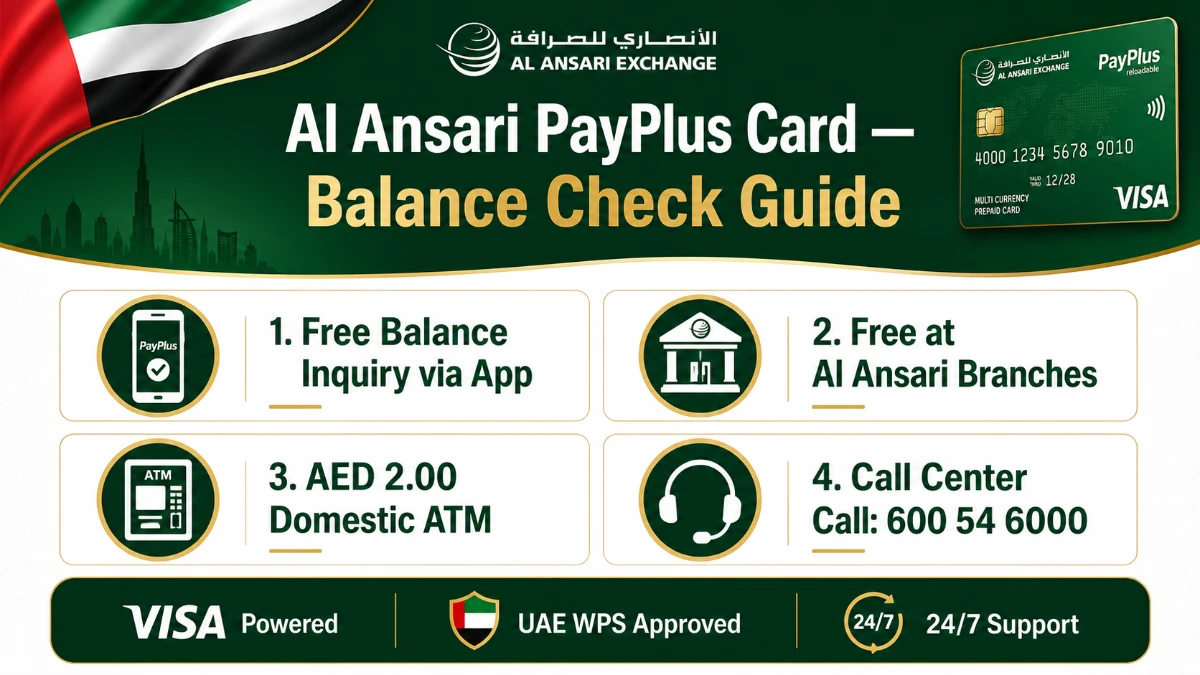
Worried that checking your salary balance will eat up your hard-earned dirhams? You're not alone. Thousands of UAE workers feel the same pinch every month-end.
Here's the deal: the Al Ansari PayPlus Card balance check is 100% free when you do it the right way — and this guide walks you through every official method, fee, and shortcut.
In this guide, you'll discover:
- Every verified balance-check method approved by Al Ansari Exchange.
- The exact PayPlus fee schedule in AED (no surprises).
- How PayPlus differs from the PayRoll card under the UAE WPS.
- Step-by-step app and branch instructions.
- What to do when something goes wrong — customer care, OTP, lost cards.
Let's dive in.
Quick Facts: Al Ansari PayPlus Card at a Glance
Before we go deep, here's the snapshot every UAE worker should bookmark.
| Item | Detail |
|---|---|
| Card Type | Visa-powered prepaid payroll card (WPS) |
| Issued By | Al Ansari Exchange (UAE) |
| Regulator | Ministry of Human Resources & Emiratisation (MOHRE) — WPS |
| Daily ATM Withdrawal Limit | AED 5,000 |
| Branch Withdrawal Limit | Unlimited |
| Balance Inquiry (App / Branch / Call Centre) | FREE |
| Domestic ATM Withdrawal Fee | AED 2.00 |
| Customer Support | 600 54 6000 (24/7) |
| Official Website | alansariexchange.com |
Cross-checked directly with Al Ansari Exchange's official Key Facts Statement for WPS — so you can rely on these numbers when planning your monthly cash flow. For more UAE money tools, see our UAE banking and balance check resource hub.
What Is the Al Ansari PayPlus Card?
The Al Ansari Exchange PayPlus Card is a Visa-powered prepaid payroll card issued under the UAE's Wages Protection System (WPS). Employers load salaries onto the card, and employees withdraw or spend the funds — no traditional bank account needed.
It was launched specifically to comply with directives from the Ministry of Human Resources & Emiratisation (MOHRE), ensuring workers across the UAE get paid on time and through a transparent channel.
Key Highlights of the PayPlus Card
- Free cash withdrawals at any Al Ansari Exchange branch in the UAE.
- Free balance inquiries on the official app, at branches, and via the call centre.
- Worldwide acceptance at ATMs and POS terminals carrying the Visa logo.
- No minimum balance requirement.
- Secure online payments using the card's CVV and 3D-secure OTP.
- 24/7 dedicated call centre for card support.
How to Check Al Ansari PayPlus Balance — 4 Official Methods
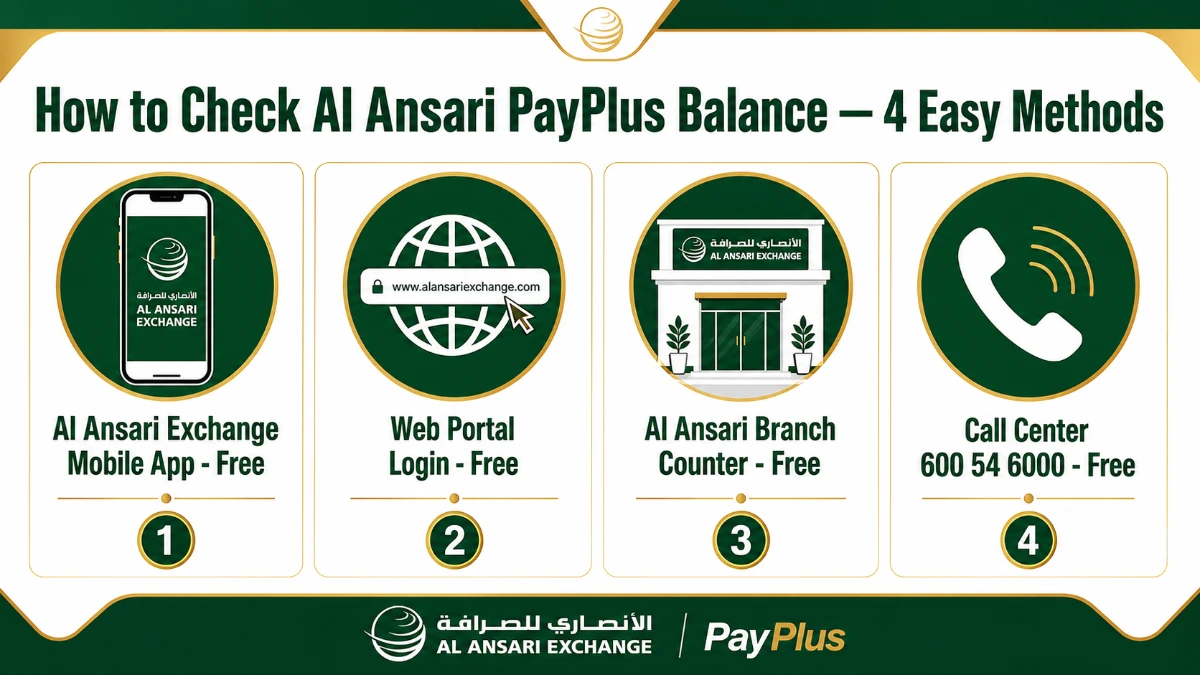
There are four official channels approved by Al Ansari Exchange. Three are completely free. One has a small ATM fee. Here's how each one works.
Method 1 — Al Ansari Exchange Mobile App (Recommended)
The mobile app is the fastest method. It works 24/7 and costs nothing.
- Download the Al Ansari Exchange app from the Apple App Store or Google Play.
- Tap "Register" and verify your UAE mobile number with the OTP.
- Add your PayPlus card under the "My Cards" section.
- Open the card tile to view your live salary balance and recent transactions.
- Optionally tap "Statement" to download a PDF e-statement.
Method 2 — Al Ansari Branch Counter
Walk into any branch with your Emirates ID and PayPlus Card. Hand them to the teller. They'll display the balance on-screen — free of charge.
Branches across Dubai, Abu Dhabi, Sharjah, and other emirates operate seven days a week, with extended hours on payday weekends.
Method 3 — 24/7 Call Centre on 600 54 6000
Prefer the phone? Dial 600 54 6000 from any UAE number. After IVR authentication (card number + last transaction), the agent will quote your balance instantly.
Method 4 — Visa-Network ATM
Insert your card at any Visa ATM in the UAE → enter PIN → tap "Balance Inquiry". This is the only paid option — AED 2.00 per inquiry domestically. Avoid it unless absolutely necessary.
Mobile App Balance Check: 5-Step Walkthrough
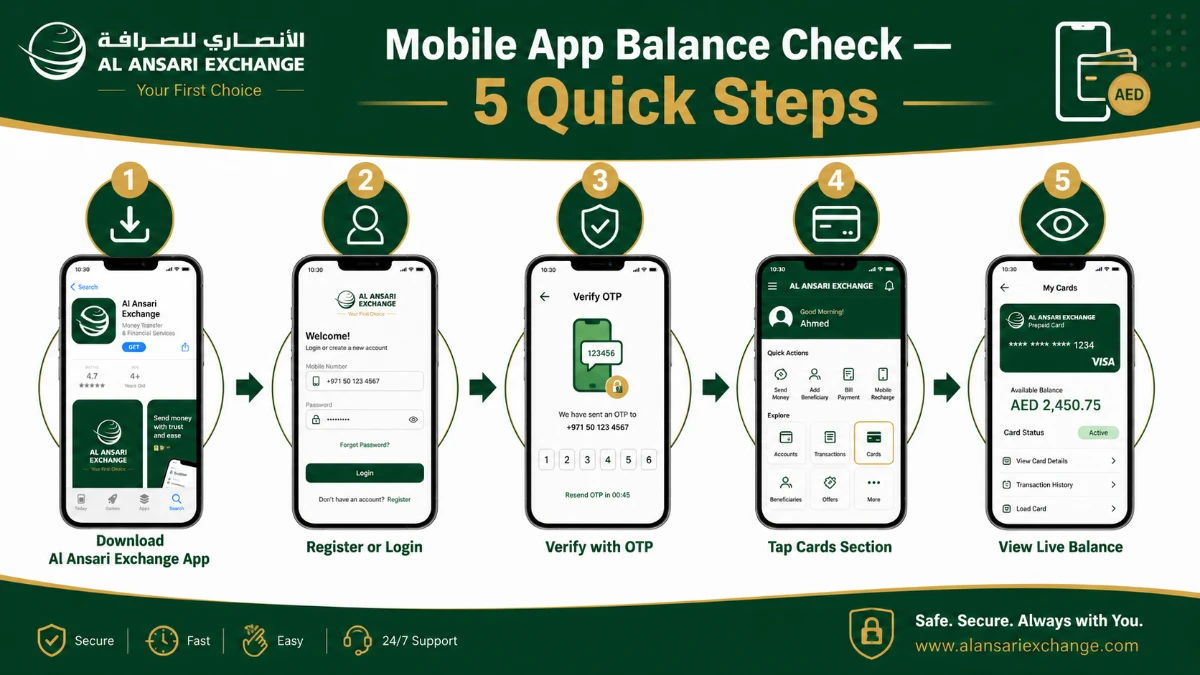
If you've never used the app, follow these five battle-tested steps. The whole process takes under three minutes the first time, and seconds afterward.
| Step | Action | Required | Time |
|---|---|---|---|
| 1 | Download the Al Ansari Exchange app | Smartphone, internet | 30 sec |
| 2 | Register / Login with UAE mobile number | Active SIM, Emirates ID | 60 sec |
| 3 | Verify with OTP | SMS access | 20 sec |
| 4 | Open "My Cards" → tap PayPlus card | Card details | 10 sec |
| 5 | View live balance + statement | None | Instant |
What to Do If the App Won't Show Your Balance
Sometimes the app fails to refresh — usually due to a weak network or expired session. Try these quick fixes:
- Pull down to refresh the cards screen.
- Log out and log back in to renew your session token.
- Make sure your card is registered with Al Ansari and has been activated by your employer.
- If the issue persists, dial 600 54 6000 for live agent support.
Al Ansari PayPlus Card Fees in AED (Verified Schedule)
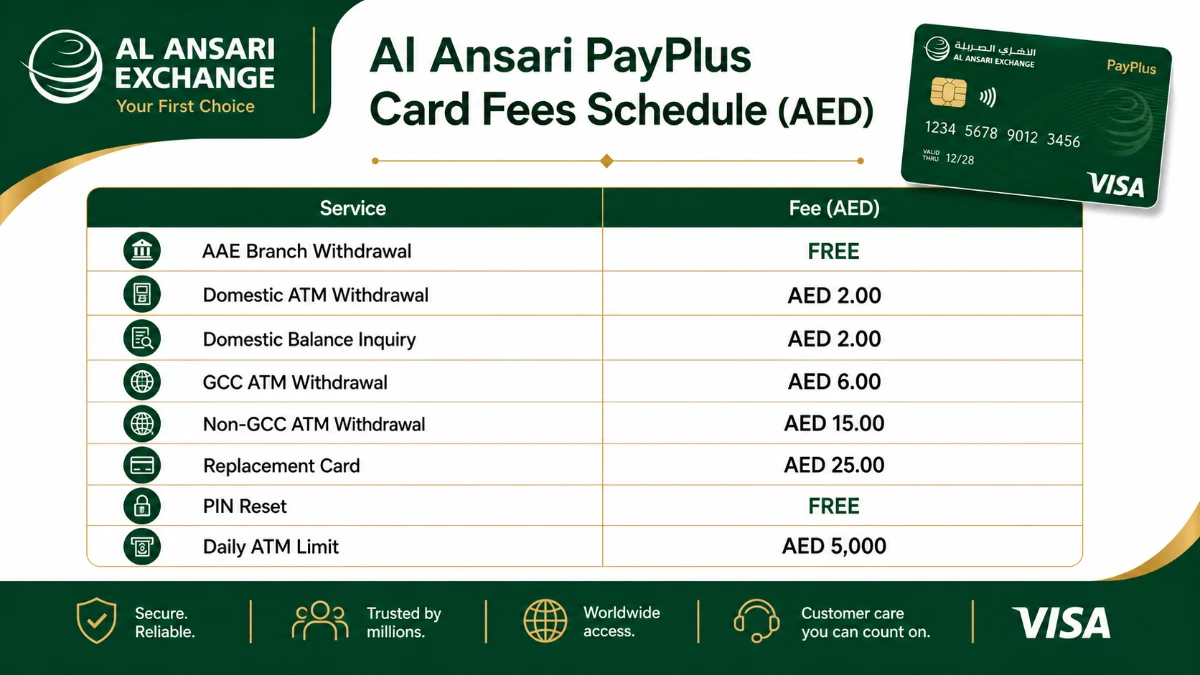
Here's the part most cardholders never read — but should. Below is the official PayPlus fee schedule straight from the Al Ansari Exchange Key Facts Statement for WPS.
| Service | PayPlus Card | PayRoll Card |
|---|---|---|
| Al Ansari Branch Withdrawal | FREE | FREE |
| Domestic POS Transaction | FREE | Not Applicable |
| International POS Transaction | FREE | Not Applicable |
| Domestic ATM Withdrawal | AED 2.00 | AAE ATMs only |
| Domestic ATM Balance Inquiry | AED 2.00 | Not Applicable |
| GCC ATM Withdrawal | AED 6.00 | Not Applicable |
| GCC ATM Balance Inquiry | AED 3.00 | Not Applicable |
| Non-GCC ATM Withdrawal | AED 15.00 | Not Applicable |
| Non-GCC ATM Balance Inquiry | AED 5.00 | Not Applicable |
| Transaction Decline Charge | AED 2.00 | Not Applicable |
| Replacement Card | AED 25.00 | AED 5.00 |
| PIN Issuance / PIN Reset | FREE | Not Applicable |
| Employee Statement (on request) | AED 20.00 + VAT | AED 20.00 + VAT |
| Daily ATM Withdrawal Limit | AED 5,000 | Not Applicable |
PayPlus vs PayRoll Card — Which One Do You Have?
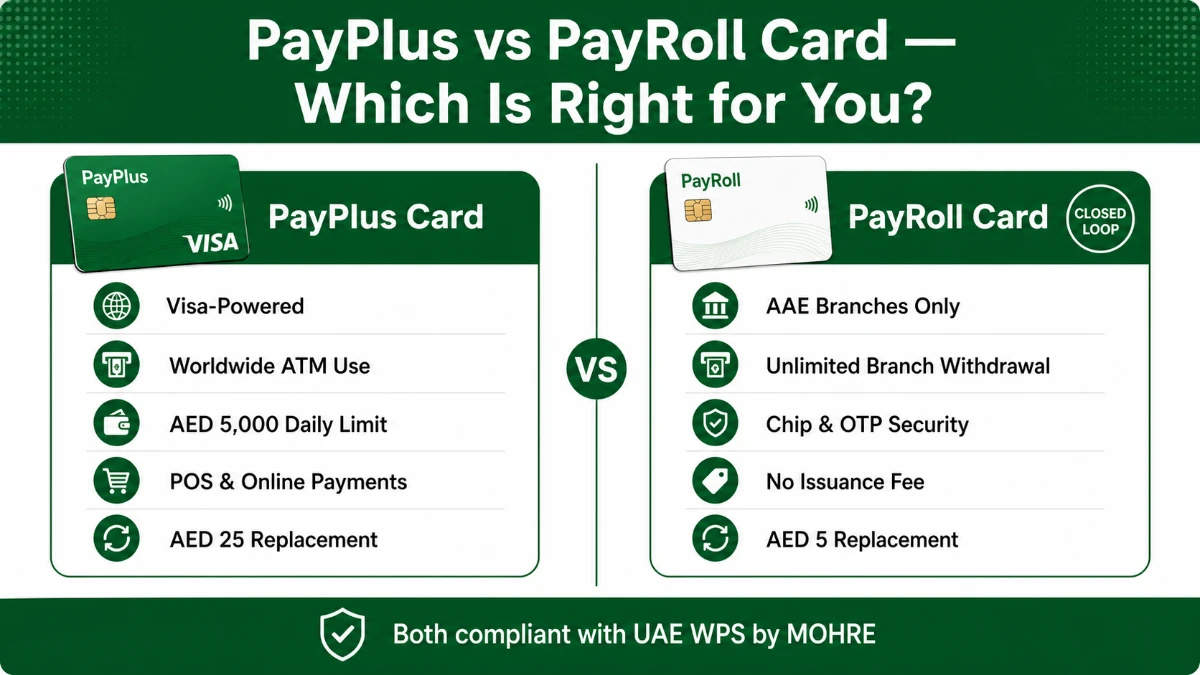
Many UAE workers don't realise their employer can issue two different Al Ansari cards under WPS. Both are legal — but they behave very differently.
| Feature | PayPlus Card | PayRoll Card |
|---|---|---|
| Card Network | Visa (open-loop) | Closed-loop (Al Ansari only) |
| Where You Can Withdraw | Any Visa ATM worldwide + AAE branches | Al Ansari Exchange branches only |
| Daily ATM Limit | AED 5,000 | No ATM access |
| Branch Withdrawal Limit | Unlimited | Unlimited |
| POS / Online Purchases | Yes — globally | No |
| Issuance Fee | Per employer agreement | FREE |
| Replacement Fee | AED 25.00 | AED 5.00 |
| Security Features | Chip + PIN + 3D Secure | Chip + OTP |
| Best For | Workers wanting global ATM/POS use | Workers withdrawing only at AAE branches |
How to Activate Your Al Ansari PayPlus Card (Step-by-Step)
Got a fresh card from your employer? Here's the activation flow used by every UAE worker, no matter the emirate.
- Visit any Al Ansari Exchange branch with the card and your original Emirates ID.
- Provide your UAE mobile number for OTP linkage and SMS alerts.
- The teller hands you a sealed PIN mailer or sets a temporary PIN you can change at the ATM.
- Sign the card receipt and acknowledgement form.
- Download the Al Ansari Exchange mobile app and register the same mobile number to unlock balance checks and digital statements.
Once activated, your salary credits will reflect on the card every payroll cycle, fully visible inside the app. Need help understanding salary cards in general? Our UAE balance-check guides hub covers most popular cards in plain English.
What to Do If Your Card Is Lost or Stolen
Time matters. Block the card the same minute you notice it missing.
- Call the 24/7 hotline 600 54 6000 immediately.
- Or email [email protected] with subject "Lost Card — Block Request".
- Visit any Al Ansari branch with your Emirates ID to request a replacement (AED 25.00 fee for PayPlus, AED 5.00 for PayRoll).
- Track unauthorized transactions inside the app and dispute them within 30 days via the official AAE dispute form.
Online (App) vs Offline (Branch) — Which Channel Wins?
Both methods are official. But each fits a different user profile.
| Criteria | Online (App / Web) | Offline (Branch / ATM) |
|---|---|---|
| Speed | Instant | Depends on queue |
| Cost (Balance Check) | FREE | FREE at branch / AED 2.00 at ATM |
| Cost (Withdrawal) | Not applicable | FREE at AAE branch / AED 2.00 at ATM |
| Availability | 24/7 | Branch hours / ATM 24/7 |
| Best For | Quick checks, statements | Cash withdrawal, complex queries |
| Document Needed | Mobile + OTP | Card + Emirates ID |
Customer Support & Official Contact Channels
If something feels off — wrong balance, missing salary credit, or stuck OTP — go straight to the official channels. Don't trust unofficial WhatsApp groups or social-media DMs.
| Channel | Detail | Hours |
|---|---|---|
| Call Centre | 600 54 6000 | 24/7 |
| Card Loss / Block | +9714 377 2640 | 24/7 |
| Complaints / Feedback Email | [email protected] | Working hours |
| General Inquiry Email | [email protected] | Working hours |
| Official Website | alansariexchange.com | 24/7 |
| Corporate Portal | eExchange.ae | 24/7 |
| Mobile App | Al Ansari Exchange (iOS & Android) | 24/7 |
For broader UAE money-management guides, you'll find more verified explainers on the inewkhusi UAE banking knowledge base, which is updated regularly with new card and balance-check tutorials.
Frequently Asked Questions
Is there a fee to check my Al Ansari PayPlus Card balance?
No. Balance inquiries are free when made through the official Al Ansari Exchange Mobile App, at any Al Ansari Exchange branch, or via the 24/7 call centre on 600 54 6000. A small charge of AED 2.00 applies only when you check your balance at a domestic ATM, and AED 3.00 (GCC) or AED 5.00 (non-GCC) when checking at international ATMs.
What is the daily ATM withdrawal limit on the Al Ansari PayPlus Card?
The Al Ansari Exchange PayPlus Card allows a maximum withdrawal of AED 5,000 per day through ATMs. There is no withdrawal limit when you collect your salary directly from any Al Ansari Exchange branch in the UAE, making branch withdrawals the most cost-effective option for cardholders.
Which app should I use to check my Al Ansari salary balance?
Use the official Al Ansari Exchange Mobile App, available on Google Play and the Apple App Store. After logging in with your registered mobile number and password, navigate to the Cards section to view your live PayPlus salary balance, transaction history, and downloadable e-statements at no charge.
What should I do if I forget my Al Ansari Exchange App password?
Tap the Forgot Password link on the login screen of the Al Ansari Exchange app or web portal. Enter your registered mobile number or email, verify the OTP, and create a new password. If you still face issues, call 600 54 6000 or email [email protected] for assistance from the support team.
How much does an Al Ansari PayPlus replacement card cost?
A replacement Al Ansari PayPlus Card costs AED 25.00 if your card is lost, stolen, or damaged. The PayRoll Card replacement is significantly cheaper at AED 5.00. To request a replacement, visit your nearest Al Ansari Exchange branch with your original Emirates ID for verification.
Can I use the Al Ansari PayPlus Card outside the UAE?
Yes. The PayPlus Card is powered by Visa and is accepted at any ATM or merchant displaying the Visa logo worldwide. International ATM withdrawals cost AED 6.00 in GCC countries and AED 15.00 outside the GCC. POS purchases globally are free, although Dynamic Currency Conversion charges may apply.
What is the difference between PayPlus and PayRoll cards?
The PayPlus Card is a Visa-powered card usable at any ATM or merchant globally with a daily ATM limit of AED 5,000. The PayRoll Card is a closed-loop card that can be used only at Al Ansari Exchange branches inside the UAE, but offers unlimited branch withdrawals with no issuance fee.
Final Word: Take Control of Your UAE Salary
Here are the three biggest takeaways from this guide:
- Balance checks are free via the Al Ansari Exchange app, branches, and call centre — never pay AED 2.00 at an ATM unless absolutely necessary.
- The PayPlus Card is Visa-powered with global reach, while the PayRoll Card is closed-loop and limited to Al Ansari branches inside the UAE.
- Your most powerful tool is the official Al Ansari Exchange mobile app — it gives instant balance, statement, and card-management access 24/7.
Ready to take charge? Download the Al Ansari Exchange app today, register your card, and bookmark this guide for next month's salary day.
Got a question we didn't cover, or had a different experience at a branch? Drop a comment below and tell us — we read every reply within a few hours.
Sources
- Al Ansari Exchange — PayPlus Card powered by Visa — https://alansariexchange.com/visa-payplus-card/
- Al Ansari Exchange — Payroll Solutions UAE — https://alansariexchange.com/service/payroll-solutions/
- Al Ansari Exchange — Terms & Conditions of the PayPlus Card — https://alansariexchange.com/terms-and-conditions-al-ansari-exchange-payplus-card-powered-by-visa/
- Al Ansari Exchange — WPS Key Facts Statement (PDF) — https://alansariexchange.com/wp-content/uploads/2019/10/Key%20Fact%20Statement%20-%20WPS%20-%20EN%20170425.pdf
- Al Ansari Exchange — eExchange Corporate Portal — https://alansariexchange.com/eexchange/
- Al Ansari Exchange — Official Homepage — https://alansariexchange.com/
All information verified from official Al Ansari Exchange sources on 5 May 2026.
