
Confused about Saudi driving licence and Muroor services? The names can make a simple task feel complicated, especially when you are new to Saudi Arabia. You need to know which account to create, which service to select, and what actually permits you to drive.
Here’s the deal: this guide separates the authority, account and licence, then walks through the published Saudi procedures without promising instant approval or guessing extra charges.
In this guide, you'll discover:
- What Muroor and Absher do.
- How to register and activate your account.
- How training bookings and licence renewal work.
- Where to check documents, violations and objections.
Let's dive in.
| Quick fact | What to know |
|---|---|
| Authority | General Directorate of Traffic (Muroor), Ministry of Interior |
| Portal / audience | Absher; citizens and eligible residents |
| Fees | Private-licence tariff: SAR 40/year; selected inquiries and bookings: free |
| Timing | Eligible online transactions may complete immediately; training and delivery differ |
| Identity / requirements | National ID or Iqama; service-specific medical and other conditions |
| Absher support | 920020405 inside Saudi Arabia; +966920020405 outside; 24/7 |
Source: Absher contact and renewal guides; GOV.SA service cards. References are listed at the end.
1. What Are Saudi Driving Licence and Muroor?
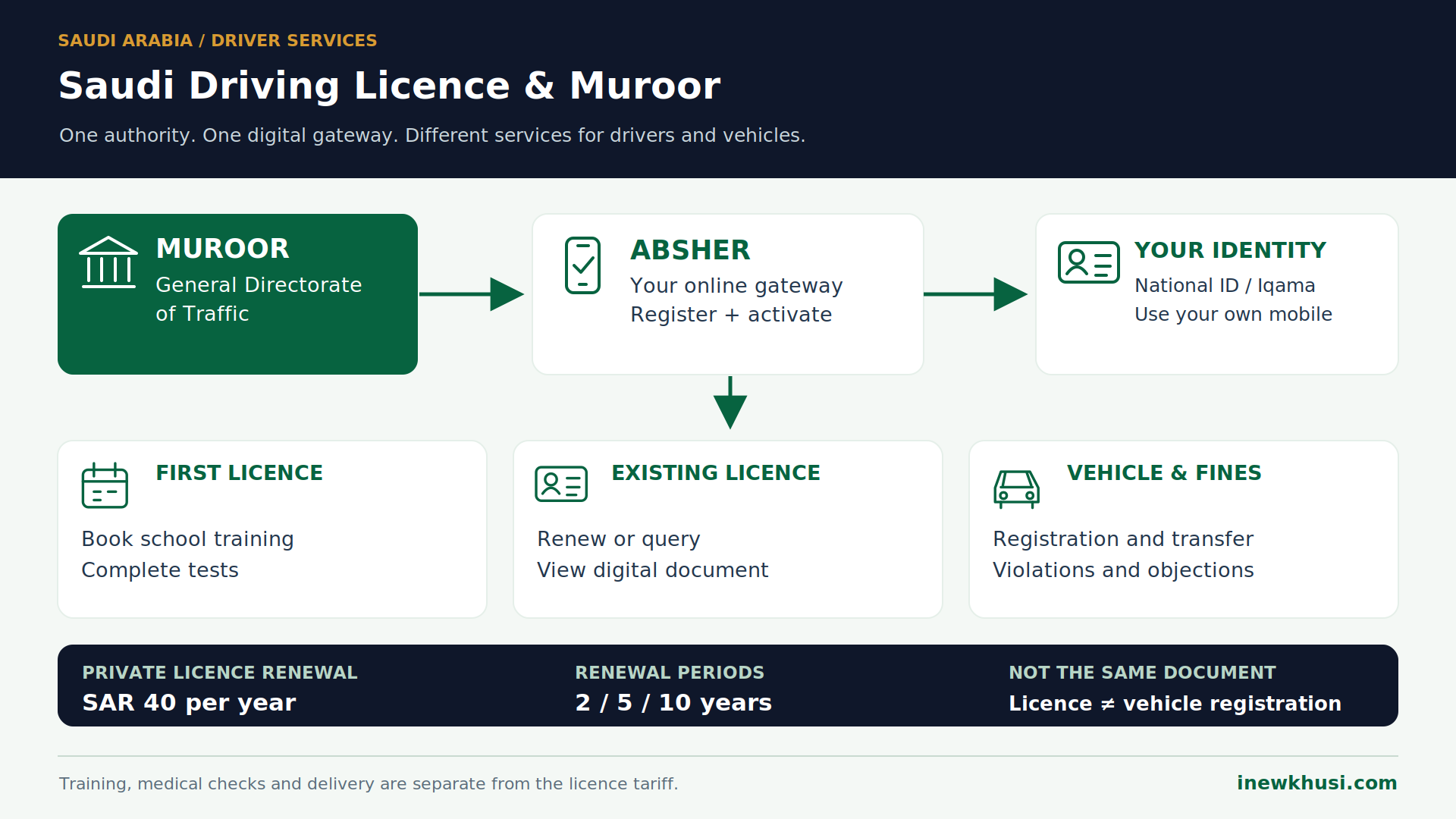
Muroor is Saudi Arabia’s traffic authority, not the name of a personal account. A driving licence is your legal permission to drive the permitted vehicle category. Absher is the digital gateway for many Muroor services. Registering for Absher does not itself issue a licence or authorize driving.
Keep one more distinction clear: Istimara means vehicle registration; it is not the driver’s licence. For related resident guidance, explore our Saudi Arabia information category.
2. Which Muroor Services Can You Use?
Absher provides separate services for drivers, vehicles and violations. Citizens and eligible residents can book driving-school appointments, renew licences, query licence information, display digital documents and manage selected vehicle services. Each service has its own conditions; having an activated account does not make every service available automatically.
| Your task | Published service |
|---|---|
| Learn / apply | Issue Driving License: authorized-school training booking |
| Maintain your licence | Renew Driving License; Query Driving License Information |
| Display your document | Dashboard → Digital Documents |
| Manage a vehicle | Registration renewal; eligible ownership transfer |
| Deal with penalties | Query Traffic Violations; Dispute Traffic Violations |
| Visit / locate a vehicle | Traffic appointment; impounded-vehicle inquiry |
Source: Absher traffic directory; GOV.SA service cards. References are listed at the end.
3. Create and Activate Your Absher Account
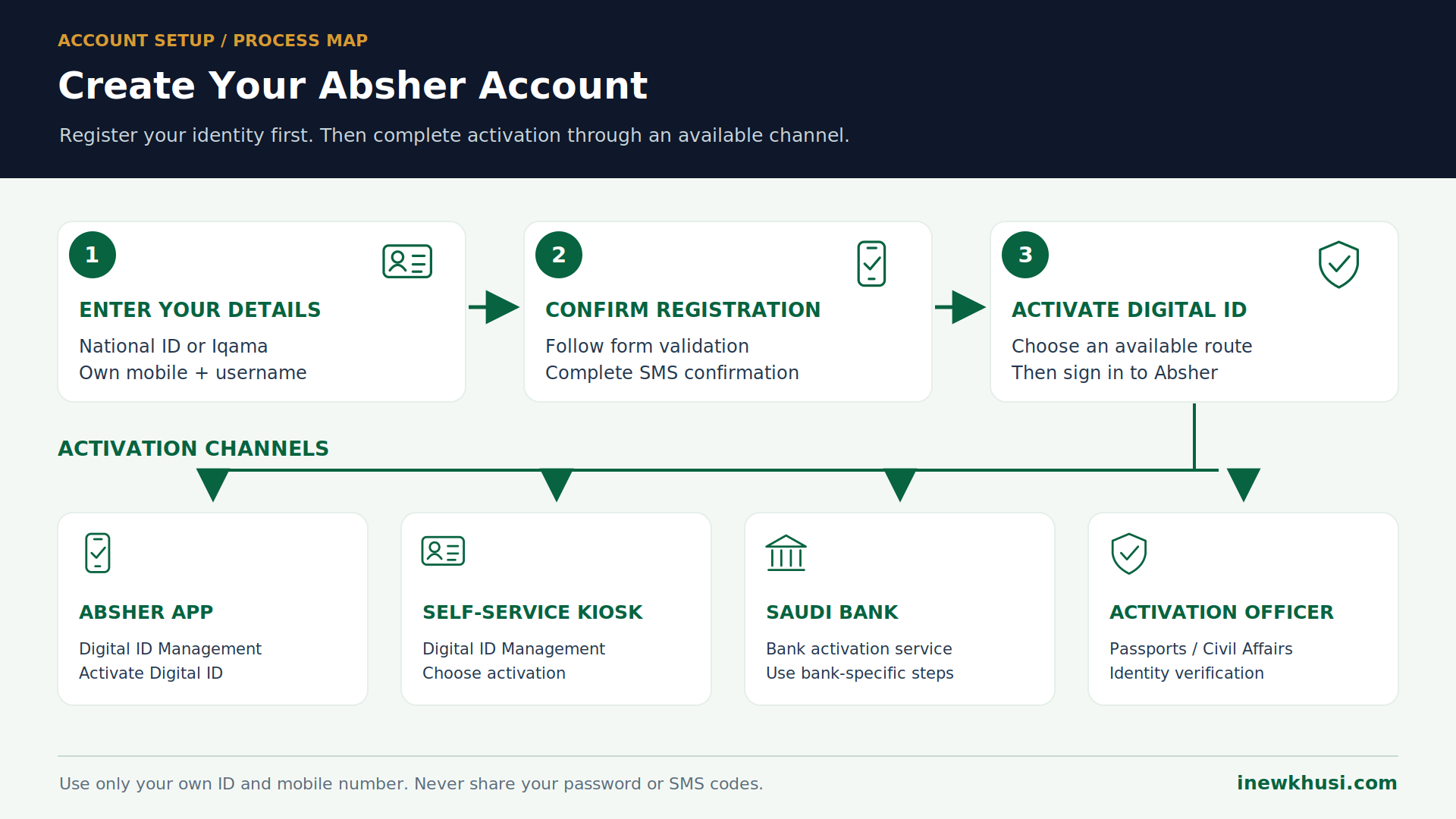
- Step 1 Open Absher Individuals and select New User / Register. Use the registration entry listed in Sources.
- Step 2 Enter your National ID or Iqama (resident identity number), personal mobile number and email if requested.
- Step 3 Choose a Latin-character username of at least eight characters, starting with a letter. It cannot be changed after registration.
- Step 4 Create a password meeting the displayed rules; select Preferred Language, enter the image code and accept the terms.
- Step 5 Complete the on-screen Confirmation and SMS-verification prompts, then finish registration.
- Step 6 Activate through Digital ID Management → Activate Digital ID in the Absher app, a self-service kiosk, a supported Saudi bank, or an activation officer. Then sign in.
For example, Bank AlJazira’s published online route uses Government Services → Absher Activation, confirmation and a verification code. Other banks have different menus.
4. Eligibility and Documents: Prepare the Right Checklist
| Item | When it matters |
|---|---|
| Age and residency | Private licence: age 18+; lawful residency for non-Saudis |
| Identity details | Your National ID / Iqama and date of birth where requested |
| Medical fitness | Licence conditions include medical fitness; renewal requires a medical examination |
| Training / test | First issuance follows required training and successful tests |
| Payments / delivery | Renewal fees; National Address details for the published delivery flow |
Source: BOE Traffic Law; GOV.SA issuance and renewal services. References are listed at the end.
For residency preparation, use our Iqama validity and expiry guide. School-specific paperwork is additional; read your selected school’s instructions instead of assuming a universal photo or sponsor-letter checklist.
5. Apply for Your First Saudi Driving Licence
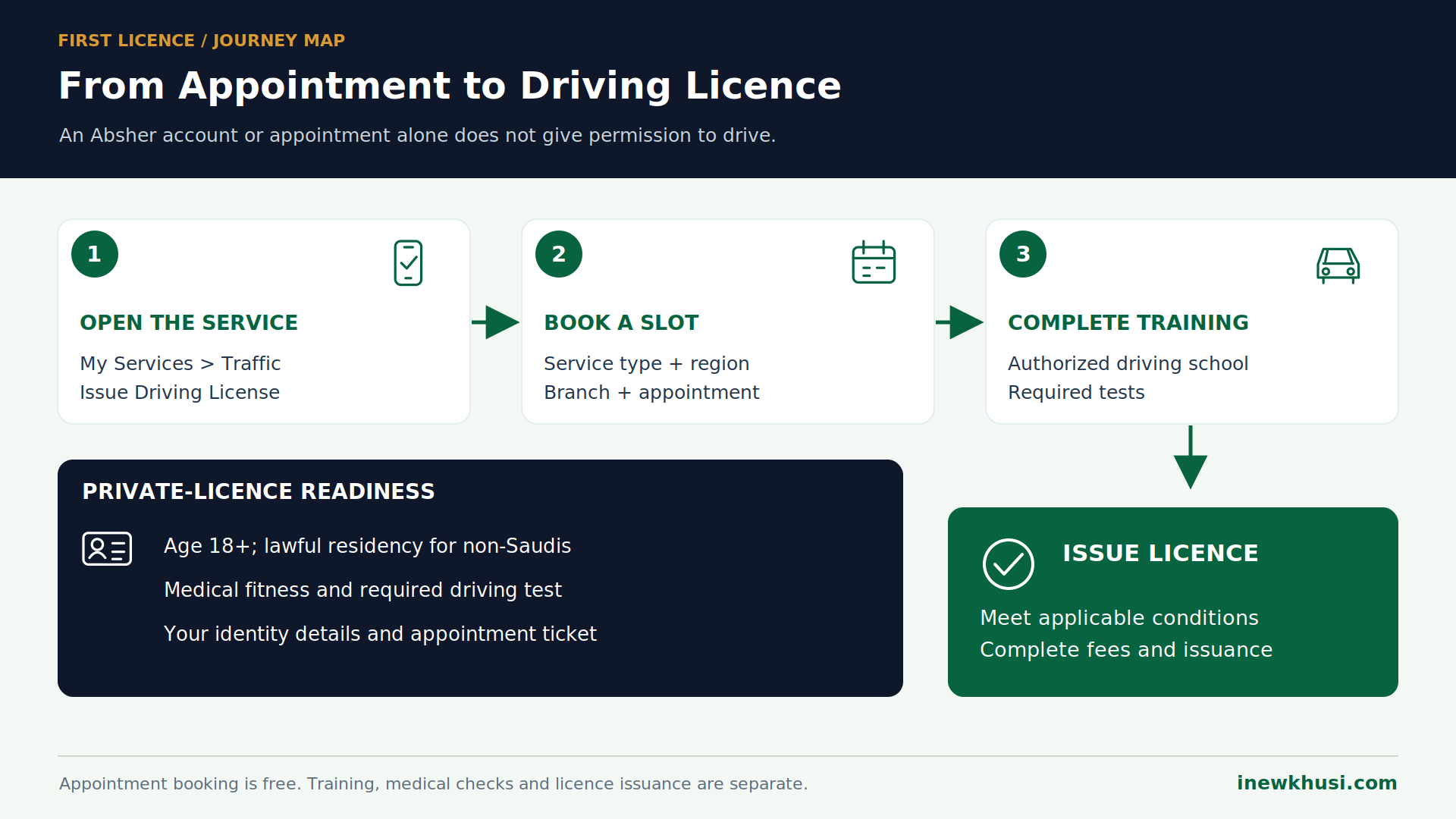
- Step 1 Sign in to Absher; choose My Services → Traffic → Issue Driving License.
- Step 2 Select Proceed to Service; enter identity details and date of birth as prompted.
- Step 3 Choose the service type, region and branch.
- Step 4 Select an available appointment time, review the details and keep the confirmation message.
- Step 5 Attend the authorized school and complete required training and tests; follow its instructions to finish issuance.
6. Saudi Driving Licence Renewal: Fees and Steps
| Private renewal period | Government licence fee |
|---|---|
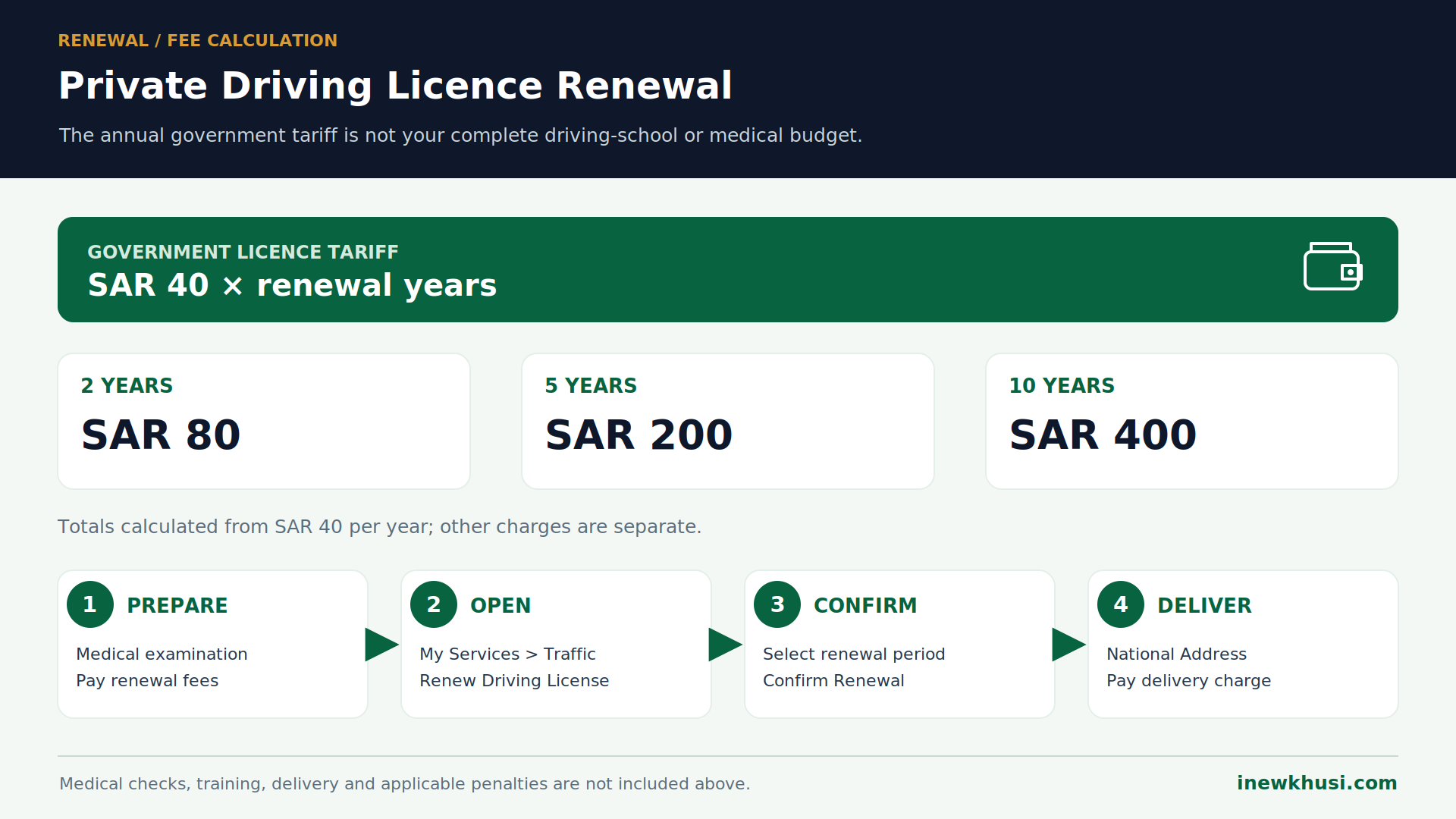
| 2 years | SAR 80 — calculated: 40 × 2 |
| 5 years | SAR 200 — calculated: 40 × 5 |
| 10 years | SAR 400 — calculated: 40 × 10 |
Source: Absher renewal tariff; GOV.SA renewal periods. References are listed at the end.
Medical, training and delivery costs are separate. No fixed total or blanket VAT adjustment is inferred here; follow the applicable invoice and payment screen.
- Step 1 Complete the required medical examination and pay the renewal fee through the supported government-payment channel, including SADAD where offered (the Saudi bill-payment system).
- Step 2 Choose My Services → Traffic → Renew Driving License; read the conditions and select Next.
- Step 3 Review your information, choose 2, 5 or 10 years, then select Confirm Renewal.
- Step 4 Enter the National Address, review details and pay the displayed delivery charge by an offered card method.
If residency needs attention first, see our Saudi Iqama renewal guide. Successful renewal is not a guaranteed delivery date.
7. Check Your Licence, Violations and Objections
- Step 1 For licence validity, choose My Services → Traffic → Inquiries → Query Driving License Information; enter the requested ID/Iqama and select View.
- Step 2 For your digital document, choose Dashboard → Digital Documents, then view the driving licence.
- Step 3 For a recorded penalty, open Query Traffic Violations. Review its details before deciding your next action.
- Step 4 To object, choose My Services → Traffic → Dispute Traffic Violations and follow the form. The Absher FAQ also calls this Traffic Violation Objection.
8. Mobile, Offline and Special Cases
Absher’s app and website offer several shared services, but not every published card lists identical channels. For a traffic-office visit, use the appointment route rather than assuming a walk-in service.
- Step 1 Select My Services → Appointments → Traffic → Book an Appointment.
- Step 2 Choose the service, region, branch, date and time; confirm and retain the ticket.
Visitors have a separate inquiry: Instant Absher Services → Visitors → Query Traffic Violations for Visitors; enter the document number and select View. This is not licence issuance.
For an existing foreign licence, ask Muroor about the applicable recognition or exchange route. This guide does not promise automatic conversion or a test exemption.
9. Common Errors and Practical Fixes
| Problem | Practical response |
|---|---|
| Account not activated | Use an available app, kiosk, bank or officer channel |
| Wrong mobile / missing code | Check your own number; use official Digital ID Management support |
| Booking mistaken for a licence | Complete the school, test and issuance stages |
| Renewal blocked | Read the exact live eligibility message; resolve the condition shown |
| Unexpected payment total | Separate the licence tariff from medical, delivery and other charges |
Source: Absher registration / activation guides; GOV.SA licence services. References are listed at the end.
If identity details are unclear, our Iqama status without Absher guide covers the related topic. For Absher technical problems, call 920020405; outside Saudi Arabia use +966920020405.
10. Frequently Asked Questions (FAQs)
Do I need a separate Muroor account?
No. For the services covered here, use your own Absher identity and select the relevant Traffic service. Muroor is the traffic authority, while Absher is the online gateway. Creating an account does not create a licence or automatically satisfy the conditions for each transaction.
Can expatriate residents apply for a private licence?
Yes, the published issuance service serves citizens and residents. The Traffic Law requires lawful residency for non-Saudis and sets private-licence conditions, including age and medical fitness. The school appointment begins the process; successful training, required tests and applicable issuance requirements still need to be completed.
Is SAR 40 the complete cost of getting a licence?
No. SAR 40 is the annual private-driving-licence government tariff, not an all-inclusive driving-school package. The 2-, 5- and 10-year renewal figures are calculated from that annual rate. Medical checks, training, delivery and any applicable penalties must be considered separately rather than silently added to that tariff.
Can I object to a traffic violation online?
Yes. The published route is My Services, then Traffic, then Dispute Traffic Violations. Absher’s FAQ requires submission within 30 days from the date the violation was recorded and states the service is free. Read the violation record and the live form before submitting your objection.
How do I get help if my account is not activated?
Use the Digital Identity Management and Activation Channels page to choose an available app, self-service kiosk, bank or officer route. Activation officers are available through Passports and Civil Affairs offices. Absher technical support is listed as available 24/7; keep your password and SMS verification codes private.
11. Your Next Step: Choose the Correct Service
Saudi driving licence and Muroor services are easier once you separate three things: the authority, your Absher account and the licence itself. Start with your own identity, then choose the service that matches your actual task.
- Register and activate: keep your own mobile number attached to your identity.
- Choose correctly: first issuance, renewal and vehicle registration are different transactions.
- Check before paying: separate the licence tariff from additional charges and read the live conditions.
Ready to proceed? Open the Absher entry in Sources and select your service, then keep its confirmation. Which part of the process has been most confusing for you? Share your experience in the comments.
Official Sources & References
- BOE — Traffic Law (private-licence conditions and tariff) — https://laws.boe.gov.sa/BoeLaws/Laws/SearchDetails/?Id=85364e57-c01e-41ba-8def-a9a700f183e9&Query=%D9%85
- Absher — Register — https://www.absher.sa/wps/vanityurl/en/registerindividuals
- Absher — Registration form — https://www.absher.sa/wps/portal/individuals/static/register
- Absher — Digital Identity Management and Activation Channels — https://www.absher.sa/wps/portal/individuals/static/footer/aoffices/
- Absher — Bank AlJazira activation instructions — https://www.absher.sa/wps/portal/individuals/static/footer/aoffices/!ut/p/z0/fY69DoIwFEZfhcX5lkaLjoQBf1jc4C7NBSqpkLbYSnh8Gxad3M5JTr58gFADGlr0QEFbQ1P0BoUUvCrS85Hfyku2Z_fylJZ5VnFWCLgC_g_ign7OM-aAnTVBrQFqR947-wp-x37Q614lrV1V5JbM6BPqgl62K1sov36QvXrQewpSGXAjNh-z4jBj/
- Absher — Renew Driving License — https://www.absher.sa/wps/vanityurl/en/guide/Driving-License-Renewal
- GOV.SA — Driving License Renewal — https://my.gov.sa/en/services/99736
- GOV.SA — Driving license issuance — https://my.gov.sa/en/services/112124
- GOV.SA — Query Driving License Information — https://my.gov.sa/en/services/538520
- GOV.SA — Digital Driving License Display — https://my.gov.sa/en/services/538696
- GOV.SA — Vehicles Registration Renewal — https://my.gov.sa/en/services/112111
- GOV.SA — Vehicle Ownership Transfer — https://my.gov.sa/en/services/112114
- GOV.SA — Dispute Traffic Violations — https://my.gov.sa/en/services/266205
- Absher — Traffic-violation objections FAQ (PDF) — https://www.absher.sa/wps/wcm/connect/individuals/70fc2587-949b-4c20-9449-51c49fec39fb/%D8%A7%D9%84%D8%A7%D8%B9%D8%AA%D8%B1%D8%A7%D8%B6+%D8%B9%D9%84%D9%89+%D8%A7%D9%84%D9%85%D8%AE%D8%A7%D9%84%D9%81%D8%A7%D8%AA+%D8%A7%D9%84%D9%85%D8%B1%D9%88%D8%B1%D9%8A%D8%A9.pdf?MOD=AJPERES&CACHEID=ROOTWORKSPACE.Z18_GPHIG0G0L0FK50QCOI6VQT2EH7-70fc2587-949b-4c20-9449-51c49fec39fb-pqBqC8K
- GOV.SA — Appointments Service — https://my.gov.sa/en/services/538565
- GOV.SA — Query Traffic Violations for Visitors — https://my.gov.sa/en/services/538585
- GOV.SA — Query Impounded Vehicles — https://my.gov.sa/en/services/538568
- GOV.SA — Transportation and Logistics — https://my.gov.sa/en/content/transport
- Absher — Traffic services directory — https://www.absher.sa/wps/wcm/connect/individuals/contents/individuals/sitemap_en
- Absher — Contact Us — https://www.absher.sa/wps/portal/individuals/static/footer/contact-us-content
All information verified from official Saudi Arabia government and regulatory sources on 6 November 2026.
