
Jawazat, Muqeem & MOFA are not three interchangeable accounts. If you are new to Saudi Arabia, knowing where to start can save you a failed registration or a wasted application.
This guide explains which authority does what, how personal access differs from business access, and which official service route fits your task. It separates published fees from charges that depend on your application.
In this guide, you'll discover:
- The difference between an authority and its digital platform.
- How Absher registration and activation work.
- Who should arrange Muqeem access.
- How to approach MOFA visas and document attestation.
Let's dive in.
| Quick fact | What to know |
|---|---|
| Authorities | Jawazat: General Directorate of Passports under the Ministry of Interior; MOFA: Ministry of Foreign Affairs. |
| Portals / apps | Absher; Muqeem (Elm); KSA Visa; MOFA Ratification; Nafath (national digital identity authentication) for supported access. |
| Audience | Residents, citizens and visitors according to the service; Muqeem business access is for establishments. |
| Service fees (SAR) | Family visit visa listing: 300; document attestation: 30. Other charges depend on the selected service. |
| Published time | Family visit visa: 5 workdays; ratification: 1 workday. These are service estimates, not guarantees. |
| Identity / documents | ID or Iqama (residence permit); passport and supporting documents depend on the application. |
| Support | Jawazat: 992. Muqeem product contact: 920029200. KSA Visa: 920011114. |
Source: GOV.SA service listings [S1–S4]; Elm product page [S7]; full links in Official Sources & References.
What are Jawazat, Muqeem & MOFA in Saudi Arabia?
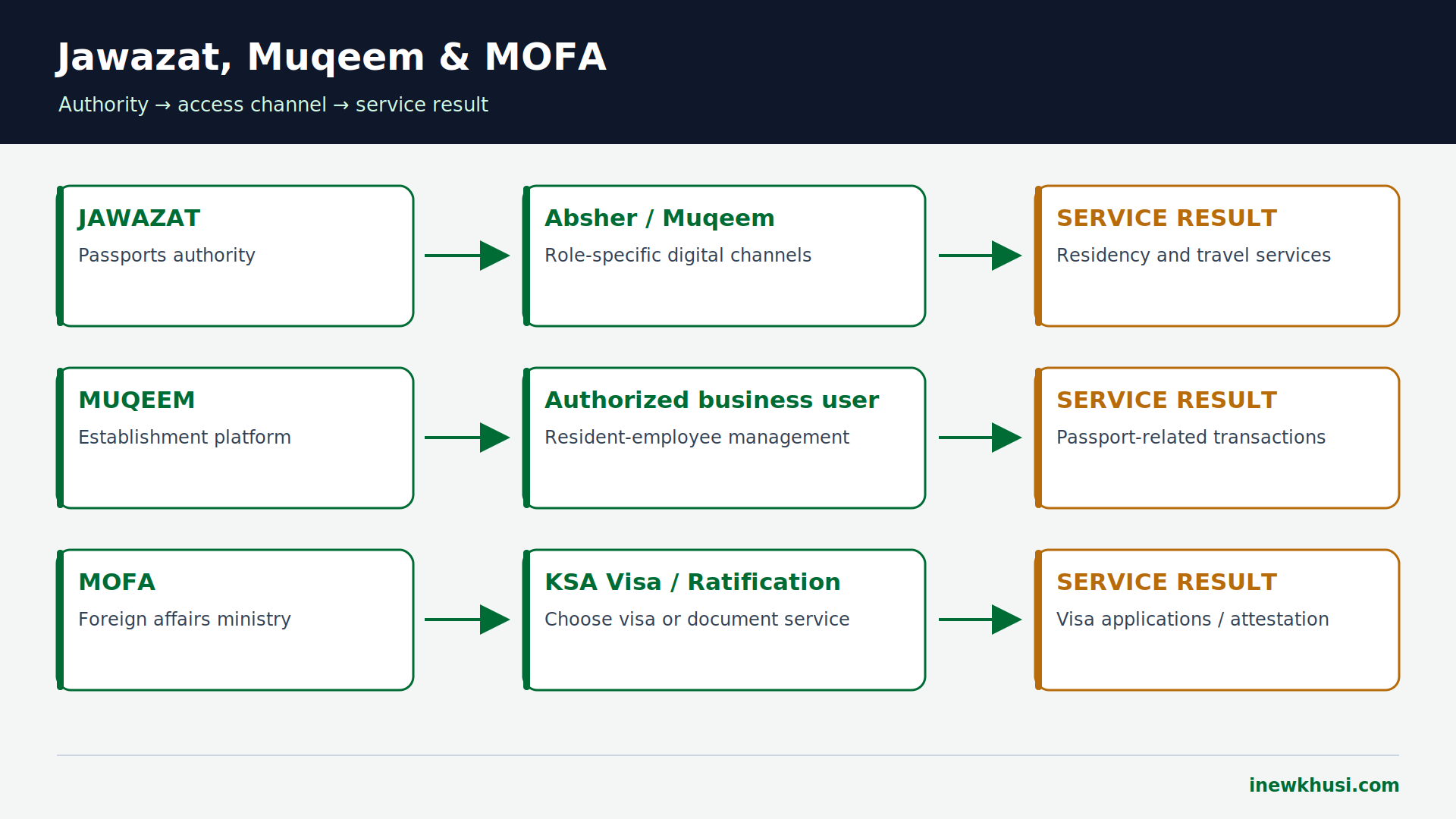
Jawazat is Saudi Arabia’s passports authority, responsible for residency and travel-status administration. Muqeem is an Elm platform through which establishments manage passport-related transactions for resident employees. MOFA is the Ministry of Foreign Affairs, whose services include visa applications and document attestation. They have different responsibilities and access routes.
| Name | Main role | Practical starting point |
|---|---|---|
| Jawazat | Residency, entry and departure administration | Absher for supported personal services; establishment channels for employer transactions. |
| Muqeem | Business management of resident-employee records and passport transactions | Establishment subscription and authorized user access. |
| MOFA | Visa and foreign-affairs document services | KSA Visa for visa services; Ratification for document attestation. |
Source: GOV.SA Jawazat directory [S1]; Elm [S7, S8]; KSA Visa and MOFA [S3, S4, S9]; full links in Official Sources & References.
There is no single shared “Jawazat–Muqeem–MOFA” login. Browse our related Iqama & Visa Services category for the residency side of your journey.
Who needs an account, and which documents apply?
Start with your role, not the portal name. An individual normally needs personal digital identity access for supported services; a company needs authorized establishment access for Muqeem. Visa applicants and document-attestation users follow their own service requirements. There is no universal document checklist or eligibility rule covering all three.
| Task | Information to prepare | When needed |
|---|---|---|
| Absher registration | Your ID / Iqama and your mobile number; follow the live form’s remaining fields | Personal registration. |
| Muqeem onboarding | Establishment information and business contact details requested by Elm | Business subscription; complete checklist must be confirmed with provider. |
| Family visit visa | Valid passport, white-background photo, medical insurance, proof of relationship, invitation/application document | GOV.SA service checklist; follow the stage-specific upload instructions. |
| MOFA attestation | Document details, electronic copy and original; identity and contact information | Online request, then original-document handover as instructed. |
Source: Absher registration [S5]; Elm [S7]; GOV.SA [S3, S4]; full links in Official Sources & References.
Jawazat personal services: create and activate Absher
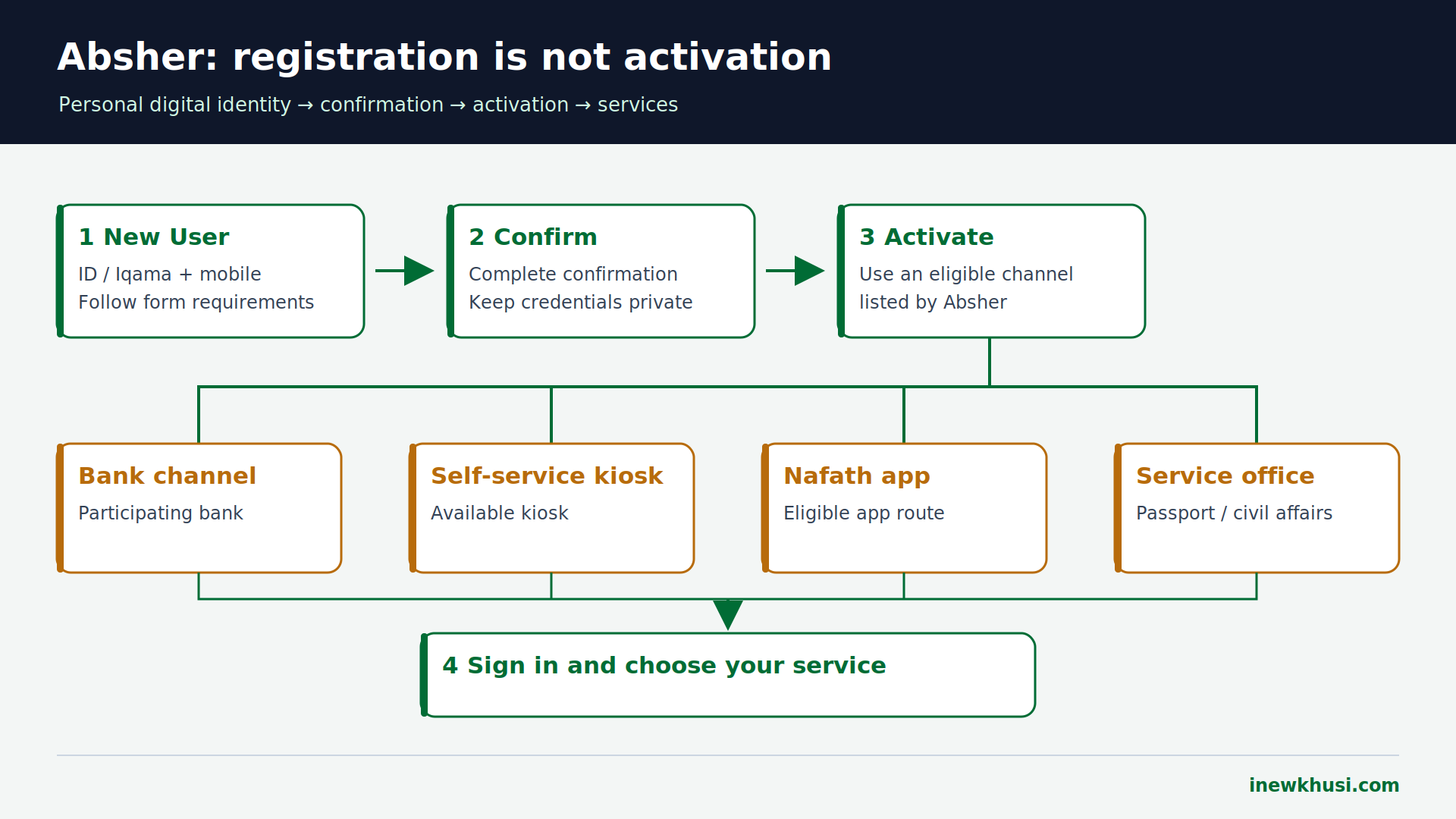
Use Absher for supported personal Jawazat services, rather than searching for a separate generic Jawazat account. Absher publishes registration and activation for citizens, residents and visitors; the live form determines the accepted identity route.
- Step 1 — Open “New User” / “Register”. Use the Absher registration page listed in the references.
- Step 2 — Enter your own information. Enter your ID / Iqama and correct mobile number. Complete the remaining live form fields and confirmation prompts.
- Step 3 — Complete activation. Absher lists bank channels, self-service kiosks, the Nafath app, and passport/civil-affairs offices. Choose a channel available to you.
- Step 4 — Sign in and choose the service. For supported family-member renewal: “Family Members” → “Resident Services” → select the person → “Renew Resident ID” → select the duration.
That renewal route is not a universal employee-renewal route. The government listing covers family members and registered domestic workers. Our Iqama validity and expiry-date guide covers the related status-checking task.
Muqeem business access: how to get started
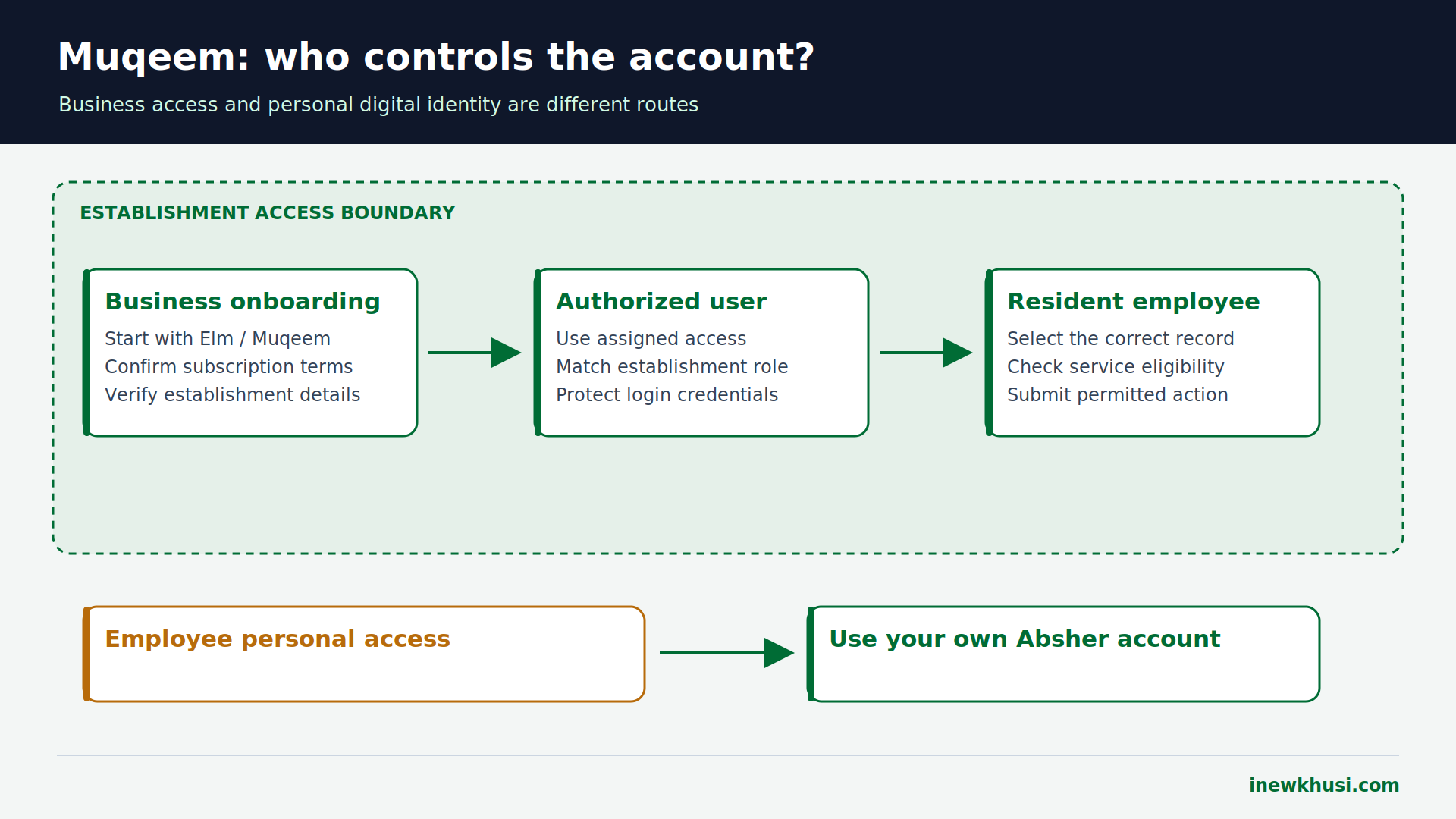
Muqeem is primarily an establishment platform, not an account every employee must buy. Elm describes resident-employee information and passport-related transactions; its service material includes Iqama renewal, exit/re-entry and final-exit functions, subject to permissions and current availability.
- Step 1 — Start through Elm’s Muqeem product route. Select the Muqeem service or contact its published product number, 920029200.
- Step 2 — Arrange establishment onboarding. Provide the business information requested in the subscription process. Confirm the current documents, package and authorized representative requirements with Elm.
- Step 3 — Confirm pricing and access. Check the written subscription terms, applicable taxes and transaction charges before paying. Use the account-access instructions supplied after onboarding.
- Step 4 — Use your permitted service. Sign in as an authorized user and follow the selected transaction’s conditions. Employees should ask their establishment about employer-managed actions.
MOFA access: visa requests versus attestation
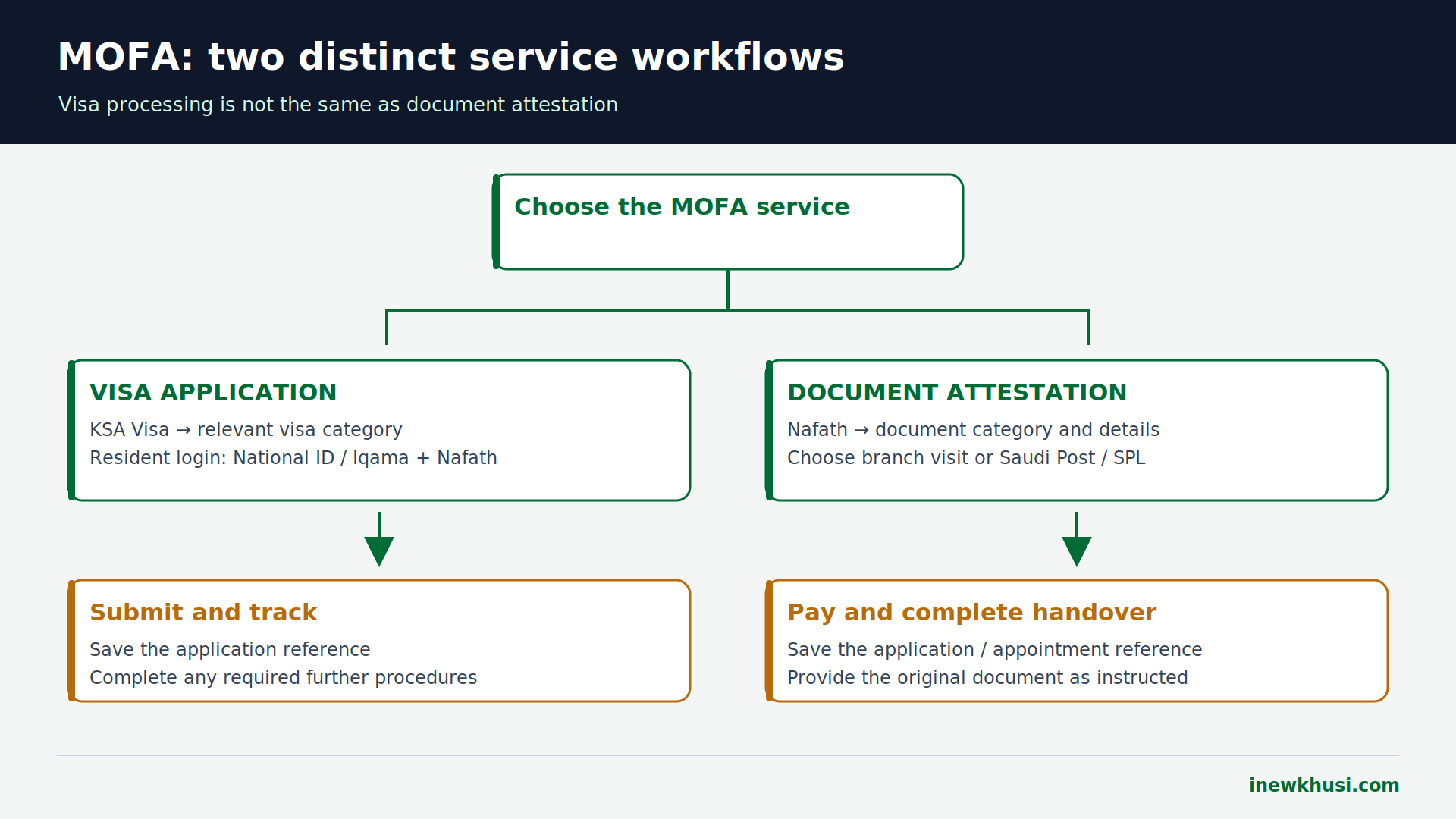
Visa services and resident login
Residents can use the supported Nafath login route. The current KSA Visa identity screen requests National ID / Iqama and approval in the Nafath mobile app. Follow the number displayed for your own login; do not approve unexpected requests.
- Step 1 — Choose the service. For a family visit request, GOV.SA lists “Services for Citizens and Residents” → “Family Visit Visa Application.” Display wording can change.
- Step 2 — Authenticate and complete the application. Enter applicant information and visitors’ details exactly as in their passports; upload the requested documents.
- Step 3 — Submit and retain the reference. Obtain employer or Chamber of Commerce attestation if required. Keep the application number and track the decision.
- Step 4 — Complete the remaining visa stages. After approval, the visitor completes the required embassy or consulate procedures. Travel only within the issued visa’s permitted validity.
Document attestation
Attestation authenticates a document; it is not a visa. Open the Ratification service through Nafath, select request type, document category and quantity, enter details, and upload the electronic copy. Choose “Branch Visit” or Saudi Post/SPL, pay electronically, retain the reference, and submit the original as instructed.
Official fees, payment channels and timelines
| Service | Published fee (SAR) | Published time | Payment / limitation |
|---|---|---|---|
| Family visit visa listing | 300 | 5 workdays | SADAD, credit card, MADA; not a verified all-inclusive travel total. |
| MOFA document attestation | 30 per attestation | 1 workday | SADAD, credit card, MADA; confirm any delivery charge separately. |
| Family / domestic-worker Iqama renewal | Variable by service | Immediate in service listing | SADAD, credit card, MADA; eligibility and payment must be satisfied. |
| Muqeem subscription | Confirm current package | Not verified | Provider terms apply; subscription and government transaction charges are different. |
Source: GOV.SA [S2–S4]; MOFA fee notice [S10]; Elm [S7]; full links in Official Sources & References.
No universal total, VAT treatment or fine is quoted here. The reviewed listings do not establish one amount across these services. Check the live payable total, insurance and delivery components before confirming. For the broader residency task, see our Iqama renewal process guide.
Common errors, alternatives and safe escalation
| Problem | Safer next action |
|---|---|
| Registered but unable to use Absher | Check whether activation is complete; use an available published activation channel. |
| Employee cannot register as a Muqeem business | Ask the establishment to handle its subscription and authorization. |
| Nafath login timed out | Restart the official login and approve the new request displayed on your own device. |
| Wrong passport details in a visa request | Review the official correction/help route before submitting another payment. |
| Visa invitation mistaken for completed visa | Follow the remaining approval and embassy/consulate stages. |
| Document uploaded but attestation unfinished | Complete the required original-document handover by branch or SPL. |
Source: Absher [S6]; Elm [S7]; KSA Visa login and GOV.SA [S3, S4, S11]; full links in Official Sources & References.
Use the right support team. Jawazat’s directory lists 992; its complaint listing describes “Reports and Complaints.” KSA Visa lists 920011114 inside Saudi Arabia and +966920011114 outside. Elm’s Muqeem product page lists 920029200.
Offline options are service-specific. Absher has published office/kiosk activation channels, and MOFA attestation has branch/SPL handover. Neither means every online service accepts walk-in applications.
Frequently Asked Questions (FAQs)
Do I need three separate accounts?
No. These names describe different organizations and access channels. Jawazat services may be delivered through Absher or an establishment platform; Muqeem access is business-oriented. MOFA visa and document services have their own routes, including supported Nafath authentication. Choose the task and applicant type before creating any new account.
Can an employee open Muqeem personally?
Elm presents Muqeem as an establishment service for managing resident employees and passport transactions. An employee should not assume a personal registration grants employer permissions. Ask your company which actions it handles and use your own Absher identity for the personal services available to you.
Is Absher registration enough to use services?
Absher separates registration from activation. Its published activation channels include banks, self-service kiosks, the Nafath app and passport/civil-affairs offices. Use a channel available to you, then sign in. An activated account still does not remove the eligibility requirements of an individual government service.
Is SAR 300 the total cost of a family visit?
GOV.SA lists SAR 300 for its family visit visa service, but that figure is not verified as the entire cost of a visitor’s journey. Check the application’s payable amount and any insurance, handling or other required components separately. Do not mistake a service listing for an all-inclusive quotation.
Does a MOFA attestation request require the original?
The government Ratification listing includes an electronic copy during submission and the original document at completion. It describes branch visit or Saudi Post/SPL as handover mechanisms. Follow the instructions for your specific request and retain its reference; uploading a scan alone does not complete the described process.
Your next step: choose the right service
Jawazat, Muqeem & MOFA solve different problems. Start by identifying your task, then choose personal, establishment, visa or attestation access. Creating accounts at random will not make an application eligible or give an employee employer-level permissions.
- For personal Jawazat services: register and activate Absher, then check the service conditions.
- For company-managed resident transactions: work with the authorized Muqeem establishment user.
- For MOFA: distinguish a visa request from document attestation and retain every reference.
Take action: open the matching official service from the references below and read its current requirements before submitting or paying. Keep the issued record’s dates, not a general processing estimate, as your travel reference.
Share your experience in the comments: which service did you use, and what part was unclear?
Official Sources & References
- [S1] GOV.SA — General Directorate of Passports — https://my.gov.sa/en/agencies/17369
- [S2] GOV.SA — Renewal of Iqama (family members / domestic workers) — https://my.gov.sa/en/services/112096
- [S3] GOV.SA — Family visit visa — https://my.gov.sa/en/services/18563
- [S4] GOV.SA — Ratification System — https://my.gov.sa/en/services/2845612
- [S5] Absher — New user registration — https://www.absher.sa/wps/portal/individuals/static/register
- [S6] Absher — Registration and activation channels — https://www.absher.sa/wps/wcm/connect/individuals/contents/individuals/Subscription_EN
- [S7] Elm — Security products / Muqeem and product contact — https://elm.sa/en/our-business/digital-products/Pages/security-products.aspx
- [S8] Elm — Muqeem service background (historical announcement; not a current tariff) — https://elm.sa/en/media-center/news/Pages/New_Service_Muqeem_Portal.aspx
- [S9] KSA Visa — Service categories — https://ksavisa.sa
- [S10] MOFA — Ratification request form and published fee notice — https://ratification.mofa.gov.sa/
- [S11] KSA Visa — Resident Nafath identity screen (open fresh from the platform) — https://ksavisa.sa
- [S12] KSA Visa — Complaints Reception Guide, March 2025 — https://ksavisa.sa/assets/docs/Complaints-Receiving-Guide-EN.pdf
- [S13] GOV.SA — Jawazat complaint or report — https://my.gov.sa/en/services/22310
- [S14] Absher Business — Existing Absher credential reuse — https://www.absher.sa/wps/portal/business/Home
- [S15] MOFA — Legacy national visa platform manual (2022; background only) — https://visa.mofa.gov.sa/Templates/UserManualEn.pdf
Research checked on 6 November 2026. Government rules, listed fees and service routes were checked against the official sources above; Elm is the primary provider source for Muqeem. Unretrievable live onboarding details are expressly identified, not represented as verified.
