
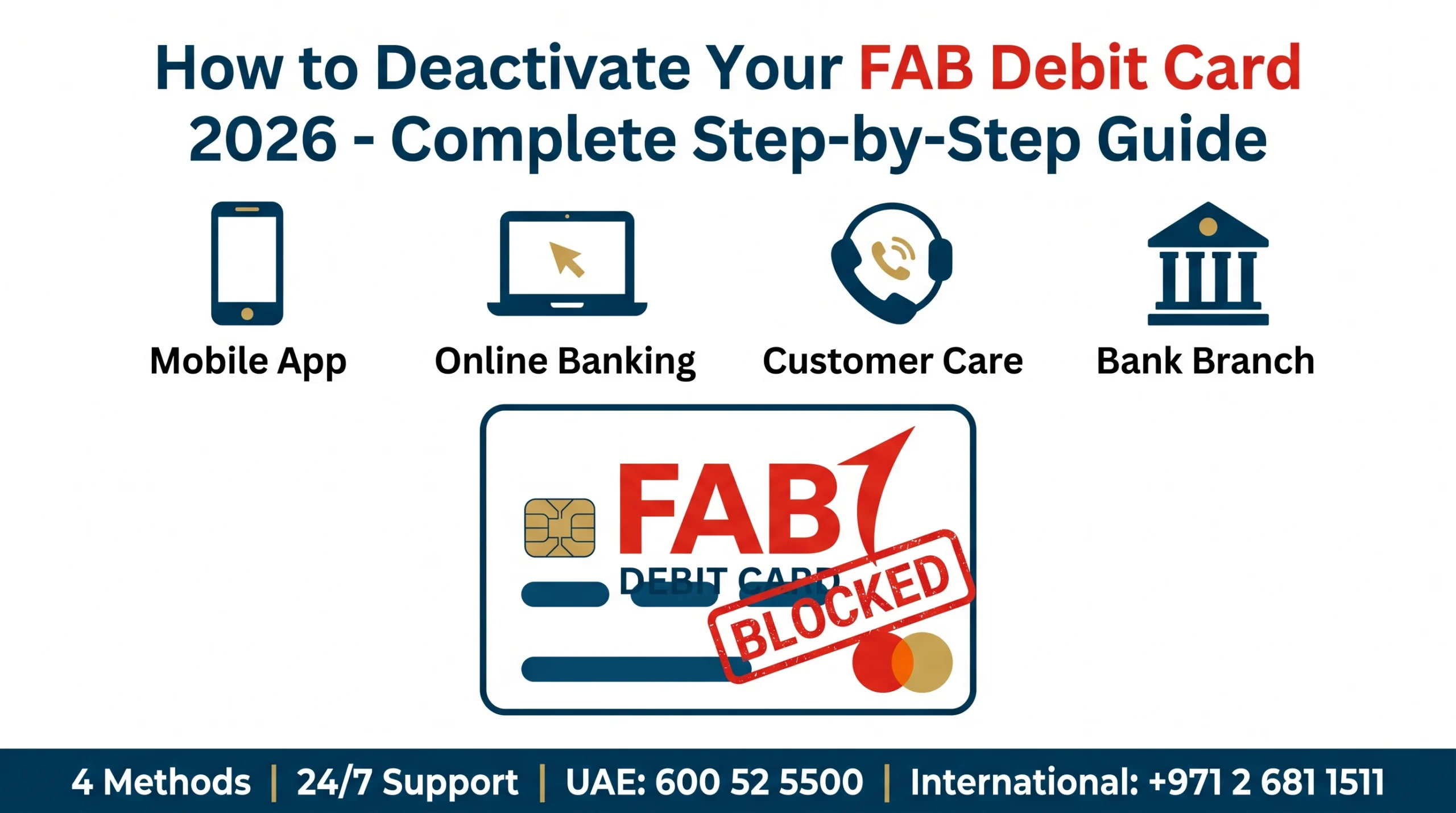
Lost your FAB debit card? Spotted a fishy transaction? Or simply leaving the UAE for good?
You need to block that card. Right now. And you need to do it the official way — not by following random blog tips.
Here's the deal: this guide gives you the only 4 methods First Abu Dhabi Bank itself approves on bankfab.com. In this guide, you'll discover:
- The fastest way to block your FAB debit card in under 60 seconds
- Step-by-step instructions for the FAB Mobile app, online banking, customer care & branch
- Official helpline numbers, fees and required documents
- FAQs answered straight from FAB's official help & support pages
- Pro tips to avoid fraud, freeze your card & request a replacement instantly
Let's dive in.
Quick Facts: FAB Debit Card Deactivation
Short on time? Here's the entire post in one table.
| Topic | Detail (Official) |
|---|---|
| Bank Name | First Abu Dhabi Bank (FAB) |
| Total Methods to Deactivate | 4 (Mobile App, Online Banking, Customer Care, Branch) |
| Fastest Method | FAB Mobile App → Cards → Block & Replace |
| UAE Helpline | 600 52 5500 |
| International Helpline | +971 2 681 1511 |
| Charges to Block Card | No charge for blocking a lost/stolen/compromised card |
| Replacement Card Fee | AED 25 (Business Banking schedule) |
| Available 24/7 | Yes — App, Online Banking & Call Centre |
| Official Website | bankfab.com |
Source: bankfab.com/en-ae/contact-us & bankfab.com fees-and-charges
Why Deactivate Your FAB Debit Card?
Before we get to the "how", let's talk "why".
FAB clearly states on its official Safeguard Your Card page that you should block a card the moment something feels off. [bankfab.com]
Here are the most common reasons:
- Lost or stolen card — block immediately to stop misuse.
- Suspicious transactions — fraud or unauthorized charges.
- Card compromised — phishing, skimming or data leak.
- Leaving the UAE permanently — close cards before exiting.
- Account closure — debit card must be cancelled before closing the account.
- Card no longer needed — switching banks or upgrading.
For UAE expats setting up new banking, you may also want to read our internal guide on opening a Dubai bank account.
4 Official Methods — Side-by-Side Comparison
FAB gives you exactly four official ways to deactivate (block) a debit card. Here's the comparison.
| # | Method | Time | Available 24/7 | Best For |
|---|---|---|---|---|
| 1 | FAB Mobile App | ~1 minute | ✅ Yes | Fastest — recommended |
| 2 | FAB Online Banking (Desktop) | 2–3 minutes | ✅ Yes | Users without the app |
| 3 | Customer Care Call | 5–10 minutes | ✅ Yes | Lost phone / no app access |
| 4 | Visit FAB Branch | 30+ minutes | ❌ Branch hours only | Account closure / paperwork |
Source: bankfab.com — Mobile Banking
Method 1: Deactivate FAB Debit Card via FAB Mobile App
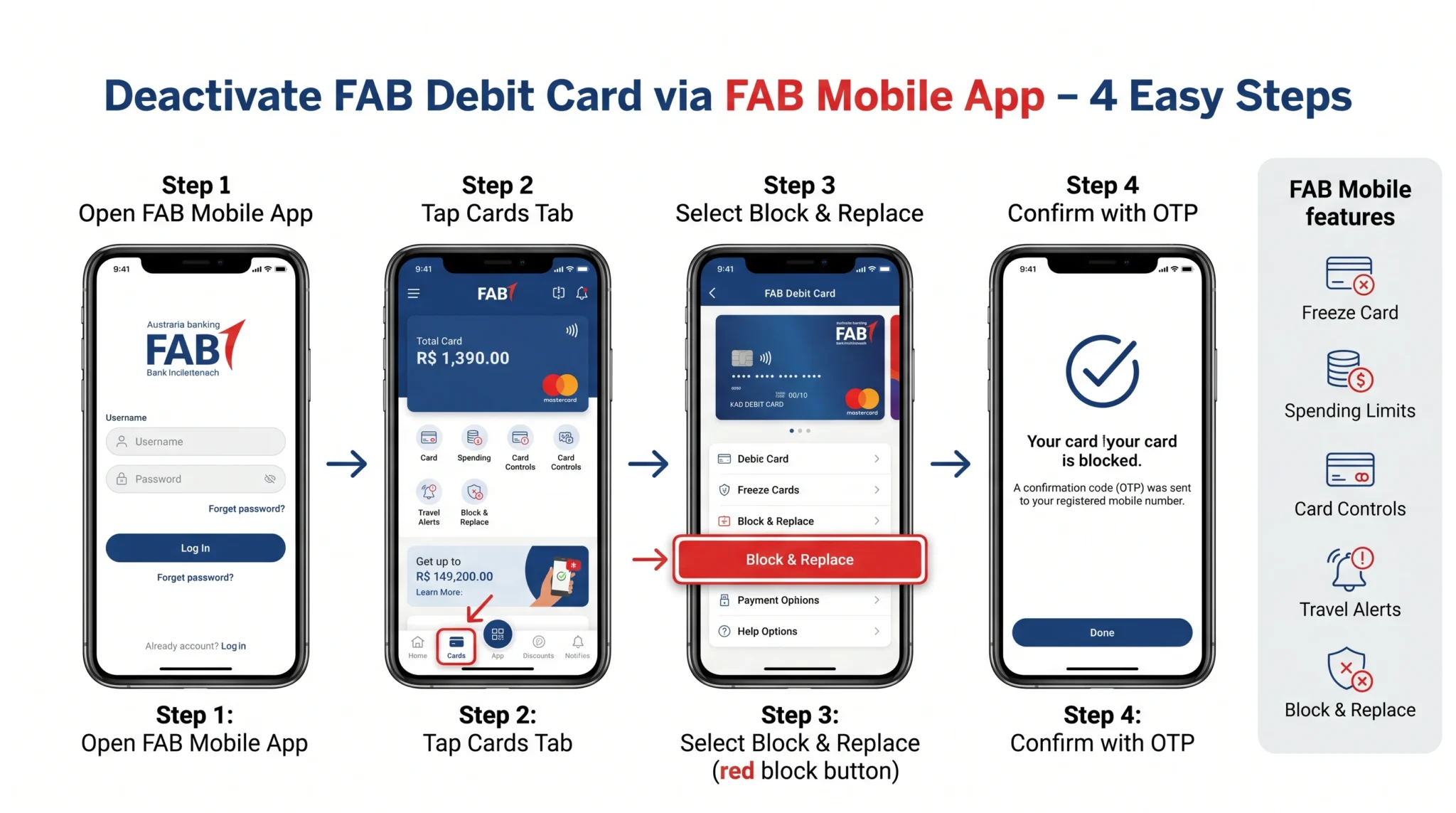
This is the official method FAB recommends on its Safeguard Your Card page.
Per FAB: "Lost, stolen, or compromised card? Block it permanently and request a replacement in just a few taps."
Step-by-Step: Block & Replace via FAB Mobile
| Step | Action | What to Do | Time |
|---|---|---|---|
| 1 | Open the App | Launch FAB Mobile (download from App Store / Google Play if needed) | 5 sec |
| 2 | Login | Enter your credentials or use biometric login | 10 sec |
| 3 | Go to Cards | Tap the Cards tab on your home screen | 5 sec |
| 4 | Select Card | Choose the debit card you want to block | 5 sec |
| 5 | Tap Block & Replace | Choose Block & Replace → confirm reason | 15 sec |
| 6 | Confirm with OTP | Verify with the OTP sent to your registered mobile | 20 sec |
Source: bankfab.com — FAB Mobile
Bonus Card Security Features in FAB Mobile
FAB Mobile gives you a full toolkit to protect your card — not just blocking. Per the official Safeguard Your Card page:
- Card Controls — instantly enable or disable online, in-store, international or cash-withdrawal transactions.
- Spending Limits — set daily limits to prevent unauthorized charges.
- Travel Alerts — update travel plans to avoid card disruption.
- Freeze Card — temporary freeze; unfreeze any time.
- Block & Replace — permanent block + new card request.
Method 2: Deactivate FAB Debit Card via Online Banking
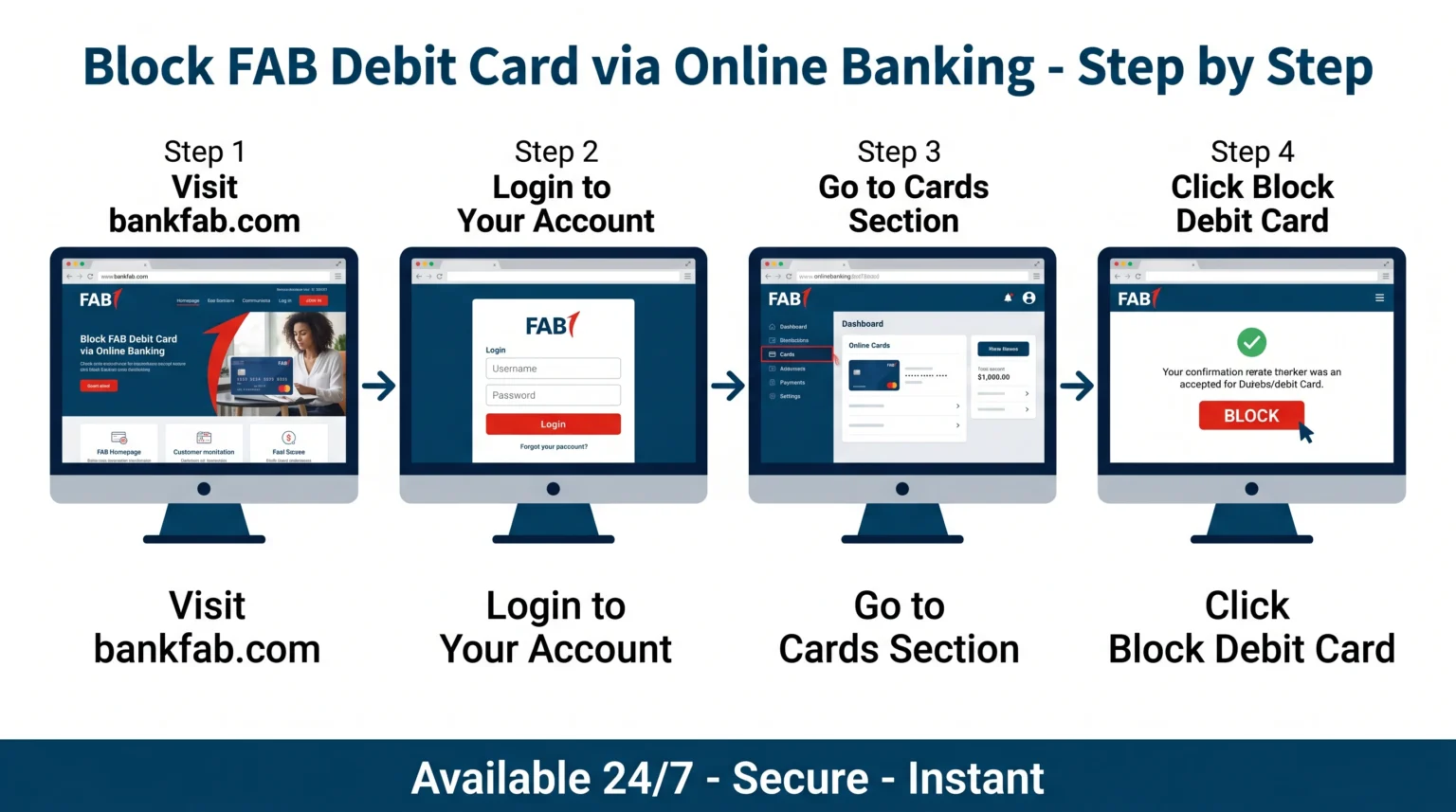
No phone? No problem. The FAB Personal Online Banking portal lets you do the same thing from any laptop or desktop.
Step-by-Step: Block FAB Debit Card via Online Banking
- Visit the official site: www.bankfab.com
- Click Login (top-right) and choose Personal Online Banking.
- Enter your User ID and Password.
- Verify with the OTP sent to your registered mobile.
- Navigate to the Cards section.
- Select the relevant debit card.
- Click Block Card (or Block & Replace).
- Confirm. You'll see a success message and reference ID.
Online Banking vs Mobile App — Which Should You Pick?
| Feature | Mobile App | Online Banking |
|---|---|---|
| Speed | ~60 seconds | 2–3 minutes |
| Biometric login | ✅ Face ID / fingerprint | ❌ Password + OTP |
| Freeze / Unfreeze | ✅ Yes | Limited |
| Block & Replace | ✅ Yes | ✅ Yes |
| Set spending limits | ✅ Yes | Limited |
| Best for | Day-to-day use | Larger screens / no app |
Source: bankfab.com — Safeguard Your Card
Method 3: Deactivate FAB Debit Card via Customer Care
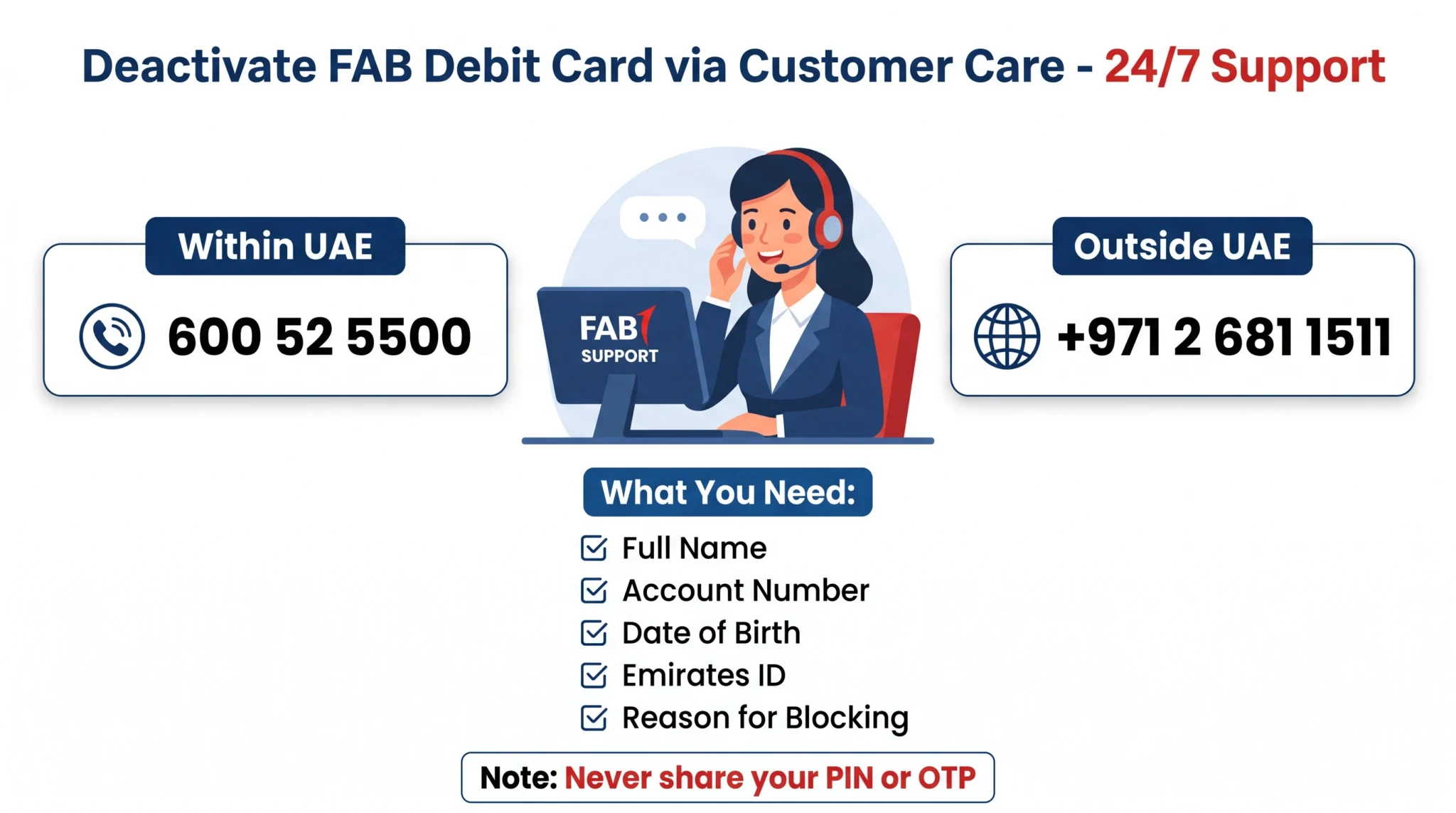
Lost your phone? Can't access the app? Just call. FAB's call centre is available 24 hours, 7 days a week.
Official FAB Helpline Numbers
| Customer Location | Phone Number | Availability |
|---|---|---|
| Within UAE | 600 52 5500 | 24/7 |
| Outside UAE (International) | +971 2 681 1511 | 24/7 |
| Online Banking Support | 600 52 5500 | 24/7 |
Source: bankfab.com/en-ae/contact-us
What You'll Be Asked During the Call
- Your full name as registered with FAB.
- Your account number or registered mobile.
- Your date of birth.
- Your Emirates ID number (residents).
- The reason for blocking the card (lost / stolen / fraud / closure).
- Whether you want a replacement card.
Method 4: Visit a FAB Branch (Offline Method)
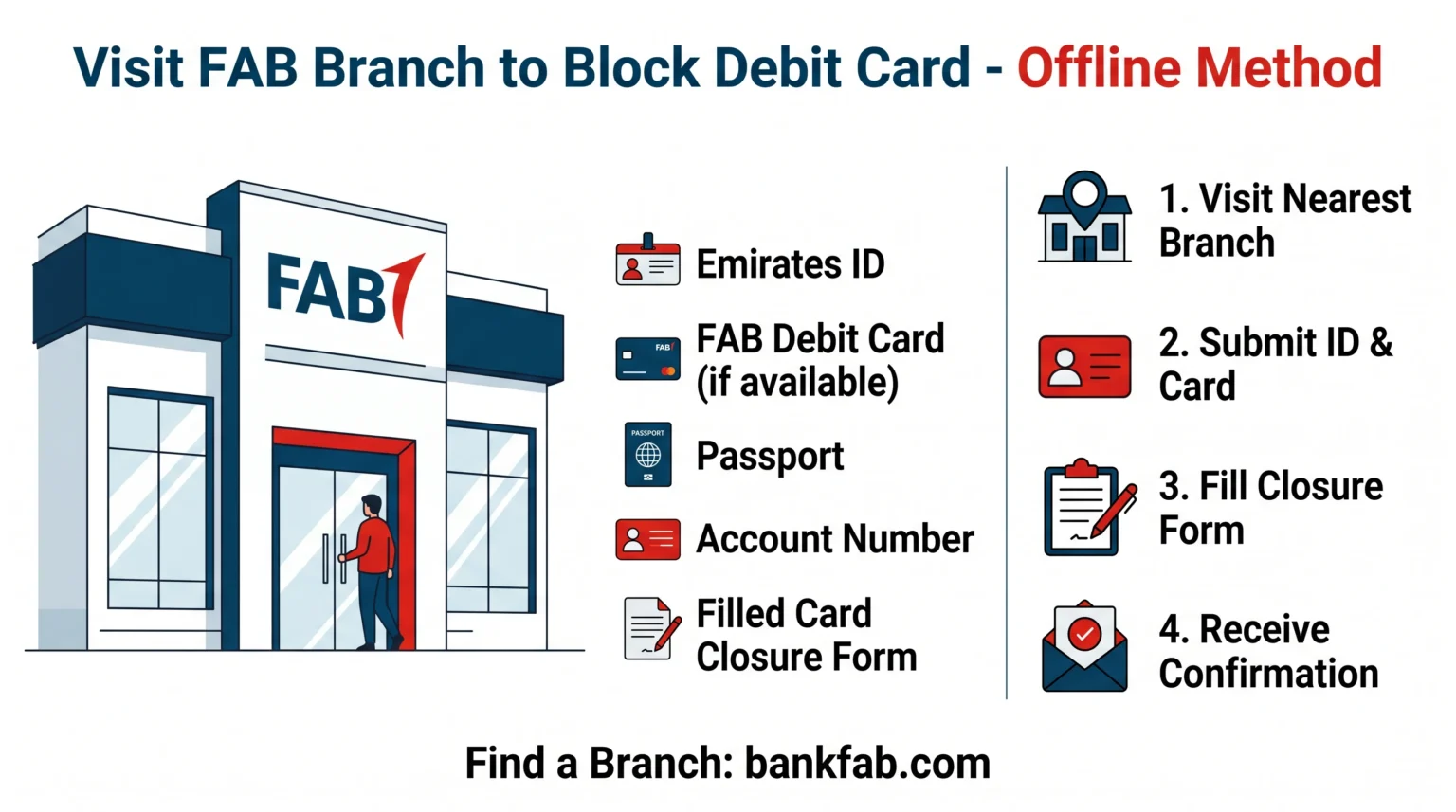
Sometimes you just need a stamped paper trail — especially if you're closing the account or settling a loan.
For that, visit any FAB branch across the UAE.
Documents to Carry to the Branch
| # | Document | Mandatory? |
|---|---|---|
| 1 | Original Emirates ID | ✅ Yes |
| 2 | Passport (with valid UAE residence visa) | ✅ Yes |
| 3 | FAB debit card (if not lost) | Recommended |
| 4 | FAB account number / IBAN | ✅ Yes |
| 5 | Card / Account Closure Request Form | ✅ Yes (filled at branch) |
Source: bankfab.com — Personal Banking Form Centre
Branch Visit — 4 Easy Steps
- Locate your nearest FAB branch using the official branch locator on bankfab.com.
- Carry all documents listed above.
- Request the Debit Card Cancellation / Account Closure Form.
- Submit it to the relationship officer. Get a stamped acknowledgement.
FAB Debit Card Fees & Charges (2026)
Here's the deal: blocking a card itself is free. But if you want a replacement, FAB charges a small fee per its official schedule.
| Item | Fee (AED) | Notes |
|---|---|---|
| Block / deactivate debit card | Free | No charge for blocking |
| Debit Card one-time issuance fee | 100 | Initial card issuance |
| Debit Card replacement fee | 25 | Replacement after block |
| Daily ATM cash withdrawal limit | 50,000 | Standard limit |
| Daily POS transaction limit | 75,000 | Standard limit |
Source: bankfab.com — Fees and Charges
Benefits vs Limitations of Each Method
| Method | Benefits | Limitations |
|---|---|---|
| FAB Mobile App | Instant; biometric login; freeze + unfreeze; replacement in app | Needs smartphone & internet; app must be installed |
| Online Banking | Works on any browser; full account view | Slower than app; no biometric login |
| Customer Care | Talk to a human; works without internet | May involve waiting; identity verification questions |
| Branch Visit | Stamped acknowledgement; ideal for closure | Time-consuming; only during branch hours |
Frequently Asked Questions
1. Is there any charge for deactivating my FAB debit card?
No. Blocking or deactivating your FAB debit card is completely free, whether you do it via the FAB Mobile app, Online Banking, customer care or at a branch. A small fee of AED 25 applies only if you request a replacement card. (Source: bankfab.com fees-and-charges)
2. What's the fastest way to block my FAB debit card?
The FAB Mobile app is the fastest method. Open the app, tap Cards → select your card → tap Block & Replace → confirm with OTP. The whole process takes around 60 seconds and the card is blocked instantly. (Source: bankfab.com Safeguard Your Card)
3. Can I freeze my FAB card temporarily instead of blocking it permanently?
Yes. FAB Mobile offers a dedicated Freeze Card feature. Per the official Safeguard Your Card page: "Spotted suspicious activity? Freeze your card instantly and unfreeze it just as easily when you're ready." Freezing is reversible — Block & Replace is permanent.
4. What number should I call to block my FAB debit card?
Within the UAE, call 600 52 5500. From outside the UAE, call +971 2 681 1511. The contact centre is available 24 hours a day, 7 days a week. (Source: bankfab.com/en-ae/contact-us)
5. Do I need to return my FAB debit card after deactivation?
Yes. Per FAB's General Terms and Conditions for Accounts: "If the Debit Card is cancelled, expired, replaced or all the Customer's Accounts with the Bank are closed for any reason, the Customer shall promptly return the card to the Bank." If the card is lost or stolen, simply inform FAB during the block. (Source: FAB Terms PDF)
6. Can I leave the UAE without deactivating my FAB debit card?
It's not recommended. If you're leaving the UAE permanently, FAB advises closing both your debit and credit cards along with your account. This avoids unwanted charges, liability for fraud and complications during future returns to the UAE. Always settle dues and obtain a clearance letter from FAB.
7. What documents do I need to deactivate my FAB debit card at a branch?
Carry your original Emirates ID, your passport with valid residence visa, your FAB debit card (if available), your account number / IBAN, and complete the Card / Account Closure Request Form available at the branch. (Source: bankfab.com Form Centre)
8. How long does it take to receive a replacement FAB debit card?
Once you Block & Replace via FAB Mobile, the new card is dispatched automatically. Delivery is typically a few working days within the UAE to your registered address. You can track status in the FAB Mobile app under Cards.
Conclusion: Block Your FAB Card the Smart Way
Let's recap the 3 biggest takeaways:
- The FAB Mobile app is the fastest, official way to block and replace your debit card — under 60 seconds.
- Blocking is free; only the replacement card carries a small AED 25 fee.
- FAB customer care is 24/7 — within UAE call 600 52 5500, internationally call +971 2 681 1511.
Don't sit on it. If your card is missing or showing suspicious activity, block it now — then think.
You may also like our internal guides on UAE bank account opening and other expat finance tips on inewkhusi.com.
👉 Ready to Block Your FAB Card?
Open FAB Mobile or visit the official portal and protect your money in seconds.
Visit Official FAB Safeguard Page →Question for you: Which method did you finally use to deactivate your FAB debit card — the App, Online Banking, Customer Care or a branch visit? Share your experience in the comments below to help other readers.
Official Sources
All information in this guide is verified directly from First Abu Dhabi Bank's official website.
- FAB Safeguard Your Card — https://www.bankfab.com/en-ae/personal/help-and-support/digital-banking/mobile-banking/safeguard-your-card
- FAB Mobile Banking Overview — https://www.bankfab.com/en-ae/personal/help-and-support/digital-banking/mobile-banking
- FAB Contact Us — https://www.bankfab.com/en-ae/contact-us
- FAB Help & Support — https://www.bankfab.com/en-ae/personal/help-and-support
- FAB Personal Banking Forms — https://www.bankfab.com/en-ae/personal/help-and-support/forms
- FAB Personal Online Banking Login — https://online.bankfab.com/PersonalBankingWeb/login
- FAB Fees & Charges — https://www.bankfab.com/en-ae/business-banking/fees-and-charges
- FAB General Terms & Conditions for Accounts (PDF) — FAB Terms PDF
- FAB Security & Certifications — https://www.bankfab.com/en-ae/about-fab/security-and-certifications
All information verified from official sources on 03 May 2026.
